Do you want to check if your WordPress posts are ranking for the right keywords? Most beginners manually check rankings for their articles by typing keywords in Google. This does not give you an accurate idea of where your articles stand for the target keyword. In this article, we will show you how to easily check if your WordPress blog posts are ranking for the right keywords.
Why Check Keyword Rankings for Your WordPress Posts?
If you follow our complete WordPress SEO guide, then you will learn how to optimize each article on your website for specific keywords. This helps you get more traffic to your website.
Most beginners simply search on Google to see if their posts are appearing for those keywords. Even then, they usually only check the first page or probably the second page at best.
The issue is that sometimes your article might be ranking way below the first two pages or worst it may not even be ranking for the keyword that you want.
If you rely on manually checking your keyword rankings, then you are missing out useful information that you can use to improve your SEO rankings and increasing traffic.
That being said, let’s take a look at how to properly check keyword rankings for your WordPress blog posts,
1. SEMRush

SEMRush is one of the best SEO and Keyword research tool on the market. It is a comprehensive SEO suite with all the useful tools you’ll need.
It comes with a powerful organic research tool that can show keyword rankings for any domain name. You don’t need to type in URLs for individual articles. It will automatically fetch results for all URLs of that domain name.
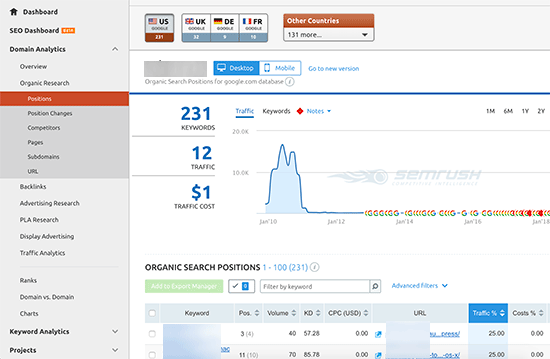
Simply enter the domain name you want to look up and SEMRush will get a ton of information. After that, click on the organic research tab to view the full list of all keywords your website is ranking for.
You can sort the results by position, URL, traffic, and more. You can also export the results to a CSV file and research offline using your favorite spreadsheet program.
You can also track specific keywords with SEMRush, and they track those keywords on your dashboard, so you can instantly see their performance.
SEMRush can do the same things for any domain name which means you can enter your competitor’s domain name and see which keywords they are ranking for. You will also be able to see their paid search traffic, paid keywords, and other useful information that you can utilize to outrank them.
2. Google Search Console
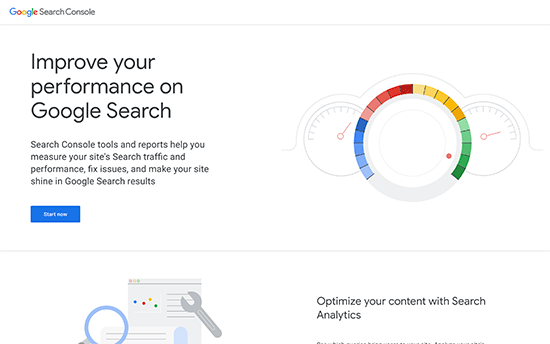
Google Search Console (formerly Webmasters Tools) is a set of tools offered by Google to help webmasters improve their website for search. See our guide on how to add your website to Google search console.
You can see your website’s performance in search results, impressions, click through rate, position, and more. It also allows you to submit XML sitemap which helps Google crawl your website more intelligently.
To view your keyword positions, click on the Performance report and then click on average position score.
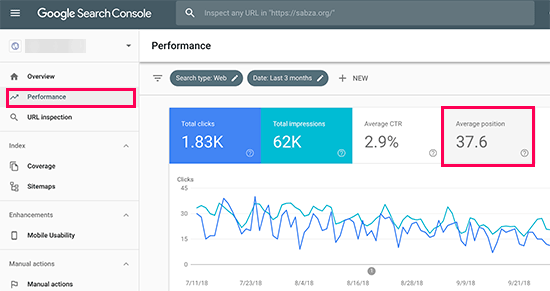
Search Console will now load your reports with average position column included. Next, you need to scroll down a bit to see the full list of keywords your site ranks for.
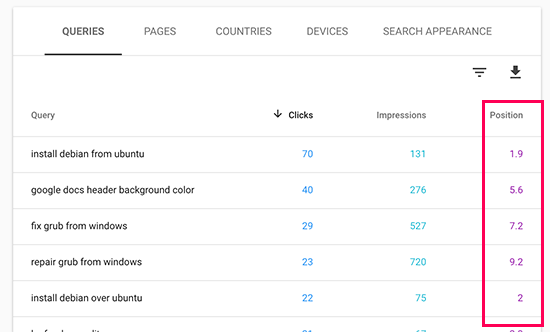
Next to each keyword, you will see how many clicks it gets, impressions, and position in search results.
You can sort the results by clicks, impressions, and position columns. By sorting using position, you will be able to see your top ranking keywords. As you scroll down, you will be able to see keywords where your site appears deeper in search results.
You can also export this data and open it with your favorite spreadsheet software.
3. Ahrefs

Ahrefs is another popular SEO Tool among professional marketers. It comes with an easy to use interface and tries to make information understandable even for new users.
Simply enter your website domain name in the search box, and it will create a neatly organized report with beautiful graphs and charts.
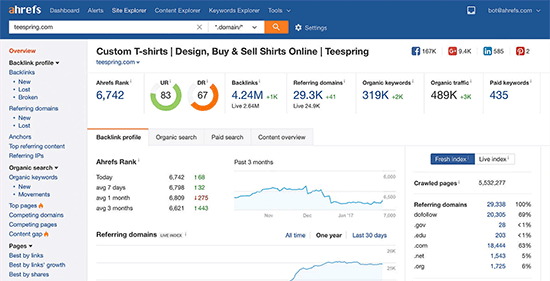
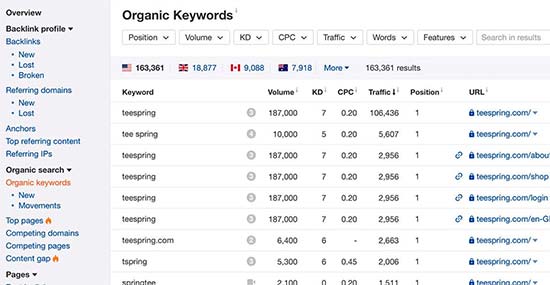
You will find all your keyword rankings under the organic keywords report. Next to each keyword, you’ll be able to see its search volume, keyword ranking position, keyword density, and more.
Using Keyword Rankings to Get More Traffic in WordPress
Now that you have learned how to check keyword rankings for your WordPress site, let’s talk about improving your rankings.
Analyzing which keywords need improvement
It’s important to note that not all keywords are created equal.
For example, ranking #5 on a high traffic keyword is way better than ranking #1 for a low traffic keyword.
There are certain aspects to this data which you may want to consider.
For example, appearing on #1 position may not always bring you the most traffic. You will see some of your keywords ranking pretty well but not getting significant clicks or impressions.
During this research, you might also find some surprise keywords that you didn’t know you were ranking for. If these keywords have significant impressions and search volumes, then you should see if you can make strategic changes to your content to improve rankings for those keywords as well.
Improving rankings for specific keywords
After you have decided which keywords you will be working on, you can go ahead and see which of your articles are ranking on those keywords and what you can to optimize them better.
Here are a few tips:
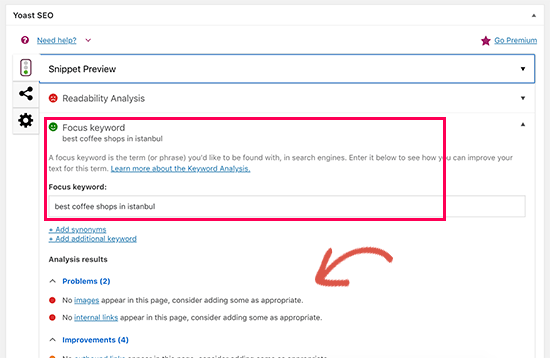
Keyword density: See how many times the keyword appears in your content. You can do that using Yoast SEO plugin. Simply enter the ‘Focus Keyword’ in SEO meta box and it will show you the analysis including the keyword density.
Outdated Information Your article can be old, not have enough content, or contains outdated information. Updating it with newer information and just improving the content can give it an SEO boost.
Internal Linking Internal linking is when you link an article from other pages of your site. Linking to an article in other related content can give it an SEO bump. Use your target keyword as the anchor text when linking to it from other articles on your website.
For more details on this topic, please see our article on how to optimize your WordPress blog posts for SEO.
Learn What Your Visitors are Doing on Your Website
SEMRush and Google Search Console can help you find your keyword positions, but they can’t show you how many visitors are coming to your articles, where they are from, and what they do when they are on your website.
All of this information is crucial when planning your content strategy to rank for certain keywords.
This is where Google Analytics comes in. It shows you the number of pageviews for your articles, your top content, your visitor information, and more.
Google Analytics can be difficult to setup for beginners, that’s why we recommend using MonsterInsights. It is a Google Analytics plugin for WordPress that will help you easily install Google Analytics and see all reports inside your WordPress dashboard.
We hope this article helped you check if your WordPress posts are ranking for the right keywords. You may also want to see our guide on actionable tips to drive traffic to a new WordPress site.
If you liked this article, then please subscribe to our YouTube Channel for WordPress video tutorials. You can also find us on Twitter and Facebook.
The post How to Check If Your WordPress Blog Posts Are Ranking for the Right Keywords appeared first on WPBeginner.
from: WPBeginner
via Editorial Staff
Source: How to Check If Your WordPress Blog Posts Are Ranking for the Right Keywords Via Business Advice.
Comments
Post a Comment