It’s the ninth fourth. On 4th of July, nine years ago, I started WPBeginner. Can’t believe we’ve come such a long way.
Like every year, I want to take a few minutes and do a quick recap of all the major things happening in business as well as my personal life.

WPBeginner Story
I started using WordPress when I was 16 years old and started WPBeginner at age 19 with a single mission: make WordPress easy for beginners.
Since then WPBeginner has become the largest free WordPress resource site for beginners.
For those of you who’re new, you can read the full WPBeginner story on our about page and use the Start Here page to get the most out of WPBeginner.
Personal Updates
My son, Solomon, is now 20 months old. Time is flying, and he’s growing up so fast. Amanda (my wife) and Solomon have been joining me on a lot of my business trips, and we have taken several fun trips as well.
Since the last WPBeginner anniversary post, we’ve been to Turkey, Dubai, Pakistan, Mexico (Cabo, Punta Mita, Cancun), and Bahamas (twice). Solomon also attended WordCamp US in Nashville which brings his WordCamp attendance count to a total of 3.

Earlier this year, I received an outstanding Young Alumnus award from University of Florida (alma mater). I also got to attend the college football game from the President Suite and got to meet tons of amazing people.

I have started working out of a physical office 3 days out of the week. This has been great because it allows me to focus and get more done. Also when I’m home, I can spend more time with Solomon. Last year, I expanded my real estate portfolio and added a Wells Fargo building. I have created my office on one of the floors, and it’s nice to have the bank as my tenant.

WPBeginner Updates
Thanks to you all, WPBeginner has continued to grow in double-digit percentage (year over year). There have been several notable updates from last year, that I’d like to highlight.
1. We passed 100,000 YouTube subscribers
One of my goals last year was to pass 100,000 subscribers on YouTube before I write this anniversary post. We did it.
We’re now at over 102,000 subscribers and our videos have over 10 million views.
If you haven’t subscribed yet, then please go ahead and subscribe to WPBeginner on YouTube (it’s free).
Now I’m just waiting to get my 3rd YouTube play button 
I have a Gold Play button and Silver play button from my other website, List25 which has over 2.3 million YouTube subscribers.
2. SSL and Push Notifications
You might have noticed that WPBeginner is now using SSL. Starting July, Google Chrome is marking all websites that are not using SSL as insecure. Even though we don’t collect any payments on WPBeginner, we went ahead with the change because we value our readers security.
If you’re looking to switch to SSL, then see our step by step guide on how to get a free SSL certificate.
As part of adding SSL, we also added Push Notifications to WPBeginner. You might have already noticed the notification to subscribe. It’s a great way to stay updated with new posts and guides from WPBeginner.
3. Audit and Rewrites
One of our goals this year is to do a major content audit of our older posts. WPBeginner has over 2000+ free WordPress tutorials. We have expanded our team, so we can bring our older posts up to date in a timely manner.
We are also preparing for a major content overhaul once Gutenberg launches. This is going to be a huge challenge for us later this year.
4. Improved WPBeginner Server Infrastructure
Just about every other week, I get an email from a user asking about the secrets behind WPBeginner’s blazing fast speed. The answer is infrastructure and caching.
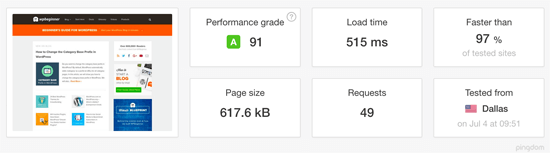
As WPBeginner grows, we need to continuously invest in our server infrastructure. Our WordPress hosting partner, HostGator, has worked to build us a completely custom infrastructure spread across multiple data-centers to ensure high availability. This past year, they improved our hardware as well as improved the caching layer that we’re using on the site.
I have been a HostGator customer since 2007, and WPBeginner has been hosted with them since day 1 (see my full HostGator review). I want to thank their entire team that helped us with the upgrade.
Note: WPBeginner is using HostGator’s multiple dedicated servers (not shared hosting).
On top of HostGator, we also use Sucuri for our web application firewall and MaxCDN as our CDN provider both play a major role in our overall website speed.
Please refer to our ultimate guide on how to speed up WordPress for more details.
Product Updates
It still surprises me when I hear people say: “I didn’t know WPBeginner was behind that product”. We even have a products page in the main website menu.
Our suite of WordPress plugins are now running on over 6 million websites (doubled from last year). Below are some notable updates:
MonsterInsights
MonsterInsights is the most popular Google Analytics plugin for WordPress. It helps you see all the stats that matter right inside your WordPress dashboard.
MonsterInsights has become one of my most favorite WordPress plugin this past year because of the brand new reporting interface and the updates our team has pushed.
The main reason why I love MonsterInsights is because it helps me grow our business with confidence. I sincerely believe that it’s easy to double your traffic and sales when you exactly how people find and use your website. MonsterInsights helps me make data-driven decisions to grow our business.
It offers custom reports for Publishers and Ecommerce sites with actionable insights that I can use to grow our revenue.
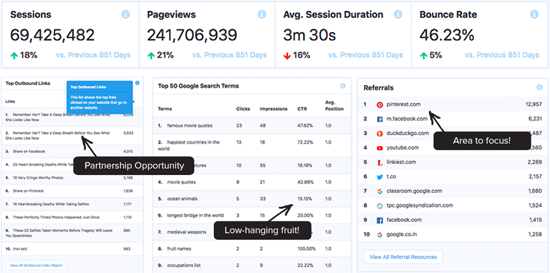
If you aren’t using MonsterInsights, then you’re seriously missing out. You can download the free version of MonsterInsights from WordPress.org, but you really need the MonsterInsights Pro version to see the true benefits because Pro version comes with more robust tracking and reports.
P.S. MonsterInsights is active on over 2 million websites.
WPForms
WPForms, our drag & drop WordPress form builder is now over 2 years old. We have stayed true to our mission: build the most beginner friendly WordPress form plugin, and it has resonated tremendously well with the larger WordPress community.
WPForms has passed over 10 million downloads and is actively running on over 1 million websites. The best part is that we have an average rating of 4.9 out of 5 with over 2100 five-star reviews.
This past year we introduced a brand new surveys and polls addon, which I believe offers the most interactive reporting in the industry.
Aside from that, we added the NPS field, new Drip email marketing integration, multi-column form layout, 100+ pre-made form templates, custom form template generator, and more.
You can download the free version of WPForms or get WPForms Pro to unlock even more powerful features.
OptinMonster
OptinMonster is the most popular conversion optimization software for WordPress. It helps you generate more subscribers and revenue from the traffic you already have by recovering abandoning visitors.
Our team recently released version 5.0 that comes with a brand new drag & drop campaign builder, more powerful targeting and segmentation options, and so much more.
The best part about OptinMonster is that it integrates with all popular email marketing services, so you can easily use it to grow your email list and get more subscribers.
WP Mail SMTP
This past year, we acquired WP Mail SMTP, the most popular SMTP plugin for WordPress. It helps users fix the WordPress not sending email issue.
This is a huge problem for the larger WordPress community including our users, so we decided to acquire this plugin and completely revamp it to make it beginner friendly.
It integrates with Gmail, Mailgun, SendGrid, and basically any other SMTP solutions. Whether you’re running a blog, membership site, or an online store, you need this plugin if you want to make sure that your WordPress emails are getting delivered.
This is a 100% free plugin, and it’s now active on over 900,000 websites
Envira Gallery and Soliloquy
If you read our last year’s anniversary post, then you know that we also had Envira Gallery, a premium WordPress gallery plugin, and Soliloquy, a premium WordPress slider plugin.
This past year, we decided to sell those two WordPress plugins, so we can better focus on our fast growing suite of growth tools.
I wrote about it on my personal blog: 5 lessons from selling a multi-million dollar WordPress plugin business.
One of the “problems” of a fast growing business is that you have to carefully choose what to focus on, and this decision has already helped us see great success in 2018.
Thank You Everyone
I want to say thank you to everyone who has supported us in this journey. I really do appreciate all of your retweets, personal emails, content suggestions, and the in-person hugs / interactions at the events.
You all are AMAZING and without you, there is no WPBeginner.
I look forward to another solid year ahead of us, and we will be planning something big for the next year because it’ll be our 10th anniversary.
Syed Balkhi
Founder of WPBeginner
The post WPBeginner Turns 9 Years Old – Reflections and Updates appeared first on WPBeginner.
from: WPBeginner
via Editorial Staff
Source: WPBeginner Turns 9 Years Old – Reflections and Updates Via Business Advice.
Comments
Post a Comment