Do you want to get a free SSL certificate for your WordPress website? You need a SSL certificate to accept online payments and secure your website. Starting today, July 1st, 2018, Google Chrome will show all websites not using SSL as insecure. In this article, we will show you how to easily get a free SSL certificate for your WordPress website.
What is SSL?
SSL stands for Secure Sockets Layer. It is an internet protocol for securing data transfer between a user’s browser and the website they are visiting.
Every internet user transfers information when they visit websites. This information can often be sensitive like payment details, credit card information, or login credentials.
Using the normal HTTP protocol means this information can be hijacked by hackers. This is where SSL or HTTPS comes in.
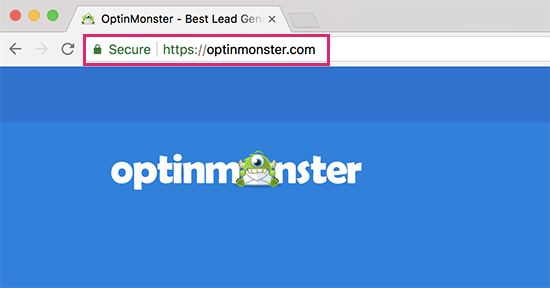
Websites using SSL need a SSL certificate issued by one of the recognized certificate issuing authority. This certificate is verified and highlighted in user’s browser address bar with a padlock sign and HTTPS instead of HTTP.
Do I need a SSL Certificate for my WordPress website?
SSL / HTTPS is recommended for all websites on the internet. However it is absolutely required for all websites that collect user information like login information, payment details, credit card information, and more.
If you are running an online store, a membership website, or require users to log in, then you need to get an SSL certificate right away.
Most online payment services also require your website to use SSL/HTTPs before you can receive payments.
Apart from security, SSL certificate also creates a positive impression of your brand among your users. Google also recommends using SSL and gives a tiny bump to SSL enabled sites in the search results.
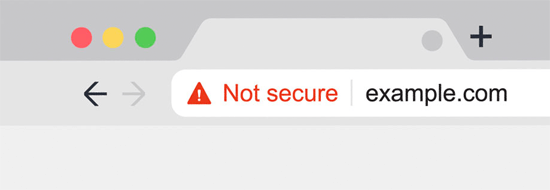
Last but not least, if your website is not using a SSL certificate, then Google Chrome will show your users that your website is not secure.
How Does SSL Certificate Work?
SSL protects information by encrypting the data transfer between a user’s browser and the website. When a user visits an SSL/HTTPs website, their browser first verifies if the website’s SSL certificate is valid.

If everything checks out, then the browser uses special keys to encrypt the data transfer. This data is then sent back to the intended server (website) where it is decrypted using the unique SSL key.
How Much Do SSL Certificates Cost?
Cost of SSL Certificates differs from one certificate authority to another. Their pricing could be anywhere between $50-200 / year. Some providers offer add-on services with their certificates which may also affect the cost of your SSL certificate.
If you are going to purchase an SSL certificate, then we recommend GoDaddy. They are the largest domain name registration service in the world, managing more than 76 million domains.
They offer simple SSL certificate plans starting from $69.9 / year. After you have purchased SSL certificate, you can ask your hosting provider to install it for you.
How Can I Get a SSL Certificate for Free?
Many website owners are reluctant to use SSL due to the additional cost. This left many of these websites vulnerable to data and information theft.
A non-profit project called Let’s Encrypt decided to fix this by establishing a free certificate authority. Due to the significance of the project, it quickly earned the support of major companies like Google Chrome, Facebook, Shopify, WordPress.com and many others.
If you want to install Let’s Encrypt by yourself, then you will need to have coding knowledge, server know-how, and Shell / SSH access to use command line tools. This makes it quite difficult for beginners to properly setup Let’s Encrypt SSL.
Thankfully, the best WordPress hosting companies are now offering free SSL certificate with all their hosting plans. Choosing one of them saves you from the hassle of installing a SSL certificate on your own.
Here are the best WordPress hosting companies that offer free SSL certificate with their hosting plans.
If you are already using one of these companies, then you can turn on your free SSL certificate from your hosting dashboard. You can also ask your hosting provider to enable it for you.
If your web hosting company does not offer free SSL, then you can easily follow our guide to switch your hosting and move your sites to one of the companies above.
Setting up WordPress After Enabling Free SSL Certificate
Once you have enabled your free SSL Certificate, you will need to set up WordPress to start using HTTPS instead of HTTP in all your URLs.
The easiest way to do this is by installing and activating the Really Simple SSL plugin on your website. For more details, see our step by step guide on how to install a WordPress plugin.
Upon activation, the plugin will check to see if your SSL certificate is enabled. After that, it will turn on http to https redirect and change your website settings to start using SSL/HTTPs.
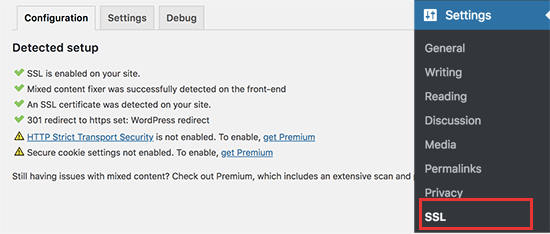
While this plugin tries to fix all mix content issues, there may still be some files loading from HTTP instead of HTTPS. To fix that, you will need to find those files using the Inspect tool and fix them.
Most commonly, these files are loaded by poorly coded WordPress plugins. If you are unable to fix them, then feel free to uninstall those plugins and find a suitable replacement.
We hope this article helped you get a free SSL certificate for your WordPress website. You may also want to see our ultimate WordPress security guide with step by step instructions to secure your website.
If you liked this article, then please subscribe to our YouTube Channel for WordPress video tutorials. You can also find us on Twitter and Facebook.
The post How to Get a Free SSL Certificate for Your WordPress Website appeared first on WPBeginner.
from: WPBeginner
via Editorial Staff
Source: How to Get a Free SSL Certificate for Your WordPress Website Via Business Advice.
Comments
Post a Comment