
How to Add a Search Bar to WordPress Menu (Step by Step)

Do you want to add a search bar to your WordPress navigation menu? Search form can be really helpful for your users to find what they’re looking for on your site. In this article, we will show you how to add a search bar to your WordPress menu.
How to add a search bar to WordPress menu

Why You Should Add a Search Bar in Menu?

A search bar makes it easy for your users to find what they’re looking for without scrolling to all the pages.

If you add a search bar to your top navigation menu, then it will appear on all pages that display the menu, and your users can easily search all the content on your site.

There are multiple search plugins that you can use to add a search bar to your site. Let’s take a look on how to add a search bar to your WordPress menu.

Adding a Search Bar to WordPress Menu

First thing you need to do is to install and activate the Add Search to Menu plugin. For more details, see our step by step guide on how to install a WordPress plugin.

Upon activation, you need to go to Settings » Add Search To Menu page in your WordPress admin area to configure search bar to your menu.
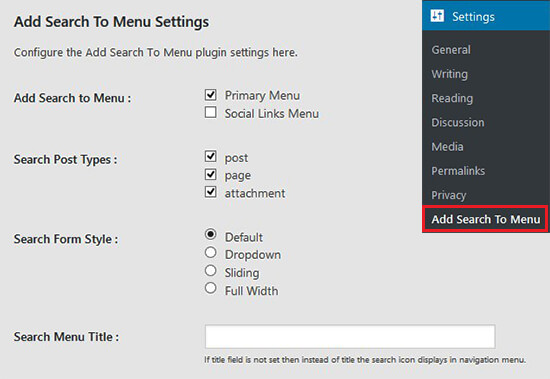
Add search to menu plugin page

On this page, you need to select the menu where you want to add the search bar. This list of menus (Primary Menu and Social Links Menu) belongs to your WordPress template. If you change the template of your site, then the list will be automatically updated with the available menus from your template.

Once selected, the search bar will be added to your navigation menu. You can define the search post types, search form style, search menu title, manage mobile display for search, and more. These settings will also help in controlling the search results for your users.

After that, you can head over to your site to see the search bar in the WordPress navigation menu.
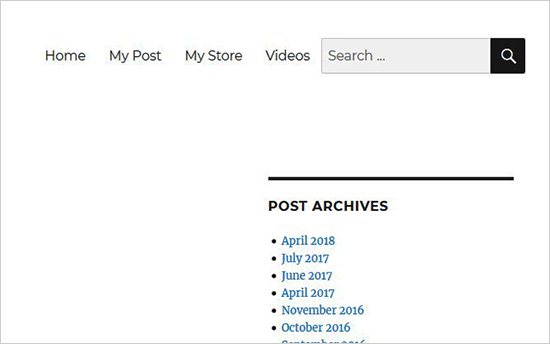
Add search bar to menu

You can also add the search bar to all other menus of your site. Simply select the menu from plugin settings where you want to display your search form.

We hope this article helped you learn how to add a search bar to WordPress menu. You may also want to see our expert pick of the useful tips and tricks to speed up WordPress site performance and search results.

If you liked this article, then please subscribe to our YouTube Channel for WordPress video tutorials. You can also find us on Twitter and Facebook.

The post How to Add a Search Bar to WordPress Menu (Step by Step) appeared first on WPBeginner.

from: WPBeginner
via Editorial Staff

Source: How to Add a Search Bar to WordPress Menu (Step by Step) Via Business Advice.

Comments

Popular posts from this blog

7 Ways to Grow Your SaaS Startup Faster

Every startup looks for ways to catapult a business to success. Here are some tips for accelerating growth for SaaS (software as a service) companies. 1. Start charging early SaaS startups are often hesitant about charging customers. They think that their product is not yet ready, that it’s necessary to get traction and focus on expanding their customer base rather than on growing revenue. Deep inside, however, they often don’t just have enough faith in their product and are not sure if someone will buy it at all. They prefer keeping hundreds or thousands of free users to attempting to win a few serious customers. Big numbers are comforting but the product remains an unverified idea. Building a product should imply increasing revenue. So don’t hesitate too much—put it to the test by charging and see if it works in the real conditions. This is one way to minimize your risk too. Instead of waiting to launch until you’ve invested huge amounts of time and money, launch early. If...

How to Add Web Push Notification to Your WordPress Site

Do you want to add push notifications to your WordPress site? Push notifications allow you to send notifications to users even when they are not visiting your website. In this article, we will show you how to easily add web push notifications to your WordPress site. We will also talk about the best WordPress push notification plugins and how to send desktop & mobile push notifications from your WordPress site. What is Push Notification? Push notifications are clickable messages displayed on top of user’s desktop or notification area on their mobile device. They can be shown even when the user’s browser is not open. Aside from desktop, web push notifications also work on mobile devices. This allows you to reach your users across devices with latest updates and offers. Web push notifications have proven to be a very effective way to convert website visitors into customers and loyal followers. Why Add Web Push Notifications to Your WordPress Site? We have already discussed tha...

7 Best WordPress Job Board Plugins and Themes

Are you looking for the best WordPress job board plugin? There are several WordPress job board plugins that you can use to easily create a job board and charge other companies to post jobs. It is one of the ways to make money from your blog , and you can even use it to post your own job openings. In this article, we have picked the best WordPress job board plugins and themes that you can use. Building a Job Board Website with WordPress WordPress is currently one of the most popular website builders in the market, powering more than 30% of all websites on the internet. It can be used to build almost any kind of website including a job board website. There are two types of WordPress websites which often confuses new users. First, there is WordPress.com which is a hosted solution. Second, you have WordPress.org also called self-hosted WordPress. See our article on WordPress.com vs WordPress.org for a side-by-side comparison. We recommend using self-hosted WordPress.org because it g...