Are you looking for a calculator plugin for your WordPress blog? There are many types of WordPress plugins to calculate prices, measurements, dates, form fields, and more. In this article, we have hand-picked some of the best calculator plugins for WordPress.
1. Calculated Fields Form

Calculated Fields Form allows you to create forms and do mathematical calculations among form fields. It comes with a form and logic builder which you can use to add fields, assign values to those fields, and define mathematical operators to run.
It is quite flexible and can be used for a wide range of use cases. The plugin’s user interface may look a little rough around the edges, but don’t let it stop you from trying the powerful features packed inside.
2. CT Mortgage Calculator
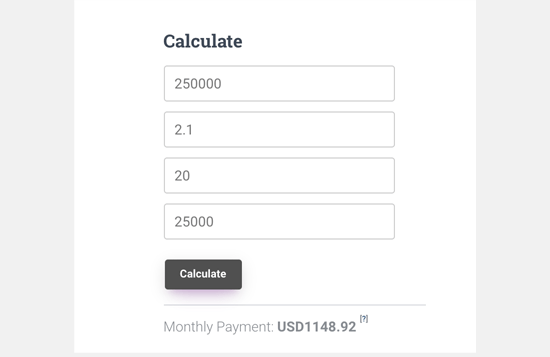
CT Mortgage Calculator allows you to easily add a simple mortgage calculator to your website. It runs well with other popular WordPress real estate plugins and comes with an easy to use widget that you can add to your sidebar. You can enter a title for the widget and enter a currency name or symbol.
It uses JavaScript to do the calculations and allows users to enter the mortgage amount, interest rate, installments, and down payment options to calculate their monthly payment.
3. Responsive Mortgage Calculator

Responsive Mortgage Calculator is another easy to use mortgage calculator for real estate websites. It comes with a sidebar widget and shortcode that you can use inside your WordPress posts, pages, and below your listings.
It also comes with light and dark color schemes however you can disable plugin styling and use your theme’s colors or add custom CSS to style the calculator.
4. Measurement Price Calculator

If you are running an online store with WooCommerce that has items available in flexible measurement sizes, then this is the plugin you will need. It allows you to add item pricing based on measurement selected by the customer.
It comes with quantity-based calculation method which automatically calculates pricing from user’s selected quantity. The other method is user-defined which allows customers to select different measurements to calculate pricing and shipping. It is tested to work well with other top WooCommerce plugins and addons.
5. WooCommerce Product Options and Price Calculation Formulas

This plugin provides additional WooCommerce product options and pricing calculation formulas. It comes with custom product layout builder which allows you to add and display more product options for each item.
It includes conditional logic and formulas to calculate pricing based on selection. You can use it to show, hide, or completely change product pricing based on customer selection. You can also use mathematical formulas to calculate product pricing and other display options.
6. WooCommerce Price Based on Country

WooCommerce Price Based on Country does exactly what it says. The plugin uses WooCommerce’s geolocation feature to guess customer’s location and then displays pricing in the local currency.
It can automatically calculate pricing by the exchange rate, or you can also manually set it for each currency. It also includes a country switcher widget which enables users to change country and currency on their own. This plugin works well with multilingual WordPress sites.
7. TimeZone Calculator

TimeZoneCalculator allows you to calculate time difference among different timezones. You can select the timezones that you want to display and then add it to your WordPress sidebar using a sidebar widget.
The plugin also comes with shortcodes which enables you to display time with timezone calculator on any page or post.
8. Date Calculator

Date Calculator is a simple plugin that allows you to calculate dates and display them using shortcodes. You can calculate dates by adding or subtracting days. You can also use a simple shortcode to display today’s date.
The shortcode also works with contact form plugins like Contact Form 7.
9. Repayment Calculator and Loan Application Form

Repayment Calculator and Loan Application form is a flexible WordPress plugin that can be used for a number of businesses. It allows users to select a loan amount, term, and calculate their monthly payments.
It comes with a number of styles with borders, colors, and backgrounds. It can be used with any currency and comes with the loan application form as well.
10. CC BMI Calculator
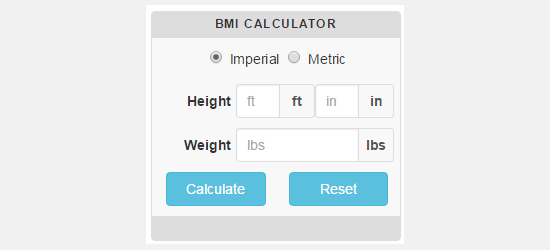
The CC BMI Calculator is a simple body mass index calculator that can be used on health and fitness websites. It allows users to enter their height and weight information to see their body mass index score.
The plugin allows you to choose different styles by changing colors however using this feature requires you to add a link to the plugin author website. It is available in both imperial and metric systems, so you can also choose which unit will be used as the default option.
We hope this article helped you discover the best calculator plugins for WordPress. You may also want to see our list of must have WordPress plugins for business websites.
If you liked this article, then please subscribe to our YouTube Channel for WordPress video tutorials. You can also find us on Twitter and Facebook.
The post 10 Best Calculator Plugins for Your WordPress Site appeared first on WPBeginner.
from: WPBeginner
via Editorial Staff
Source: 10 Best Calculator Plugins for Your WordPress Site Via Business Advice.
Comments
Post a Comment