Recently one of our users reported that the ‘Add Media’ button on their WordPress site has suddenly stopped working. This problem does not display any error or warning which leaves users clueless about why their ‘Add Media’ button is not working. In this article, we will show you how to easily fix the ‘Add Media’ button not working issue in WordPress.
What causes the WordPress ‘Add Media’ Button to Stop Working?
This problem is commonly caused by conflicting scripts or stylesheets loaded by WordPress plugins or themes installed on your site. The default behavior of WordPress is to load all required scripts and stylesheets by combining the requests.
This is usually done in the WordPress admin area to improve performance and speed.
The WordPress post editor uses JavaScript for all buttons on the screen including the add media button. A conflict can stop JavaScript from working which will disable the ‘Add Media’ button.
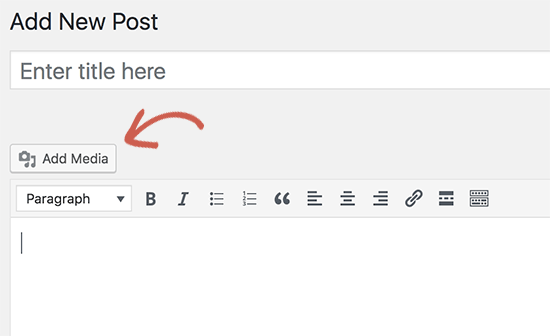
That being said, let’s take a look at how to troubleshoot and fix the ‘Add Media’ button not working in WordPress.
Fixing Add Media Button Not Working Issue in WordPress
The quick fix is to add the following code to your wp-config.php file. You can do this by editing wp-config.php file and adding this code just before the line that says ‘That’s all, stop editing! Happy blogging’.
define('CONCATENATE_SCRIPTS', false );
This code simply tells WordPress to load each script separately which helps avoiding a JavaScript conflict with buggy scripts and the core WordPress features.
After you have added the code, go ahead and the visit post edit screen to see if the add media button is working as expected.
Note: Adding this code is not a proper long-term solution because you still have a script that is causing the issue. An easier way to find the source of the problem is by using the inspect tool. It will show you console errors which can lead you to the source of the conflict.
If you want a long-term fix for this issue, then you need to perform the basic WordPress troubleshooting tips to figure out which plugin or theme may be causing the issue.
We strongly recommend that you do this on your staging site instead of a live site. Here’s a step by step guide on how to create a WordPress staging site. All the best WordPress hosting companies like Bluehost, SiteGround, WP Engine, and Liquid Web offer 1-click staging functionality.
On your staging site, you need to start by deactivating all your WordPress plugins and then check if it fixed the ‘Add Media’ button. If it does, then this means one of the plugins was causing the issue.
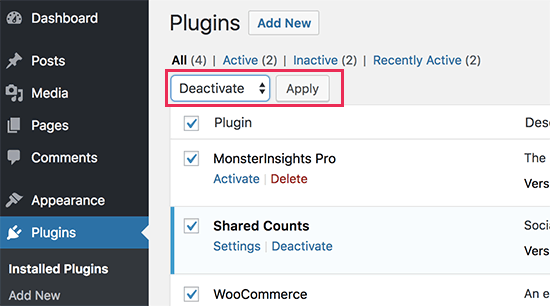
You can now activate the plugins one-by-one, and after activating a plugin check the ‘Add Media’ button. This will help you find out which plugin is causing the issue. After you find the culprit, you can replace it with another plugin or ask plugin author for help.
If deactivating plugins doesn’t solve the issue, then the next step is to temporarily switch to a default WordPress theme like Twenty Seventeen.

If switching to the default theme fixes the issue for you, then this means your theme is causing the conflict. You can ask theme author for support or switch to a different WordPress theme.
Once you find the source of the problem on your staging site, then you can apply the fix on your live WordPress site.
We hope this article helped you learn how to fix add media button not working in WordPress. You may also want to see our list of the most common WordPress errors and how to fix them.
If you liked this article, then please subscribe to our YouTube Channel for WordPress video tutorials. You can also find us on Twitter and Facebook.
The post How to Fix Add Media Button Not Working in WordPress appeared first on WPBeginner.
from: WPBeginner
via Editorial Staff
Source: How to Fix Add Media Button Not Working in WordPress Via Business Advice.
Comments
Post a Comment