Are you looking for the best WordPress survey plugin for your website? Surveys allow you to collect user feedback, so you can use it to improve your business. In this article, we will compare the best WordPress survey plugins in the market.

What to Look for in a WordPress Survey Plugin?
There are many ways you can collect user feedback on your website. You can add a contact form, create polls, ask users to leave comments, and more.
Adding a survey is a little bit more involved than that. You need to make it engaging, fun, and easy to get maximum user participation.
A good survey plugin makes your form look great, and it’s easy to use. Reporting is crucial for surveys. That’s why you need to make sure that you can store user submitted data with an option to export it, so you can use it in a spreadsheet or a CRM software.
You also need to consider how you want to share the survey results. If you want to display the results on your website, then you will need a plugin that lets you embed survey results in a beautiful format.
That being said, let’s take a look at some of the best WordPress survey plugins and how they handle all these features.
1. WPForms
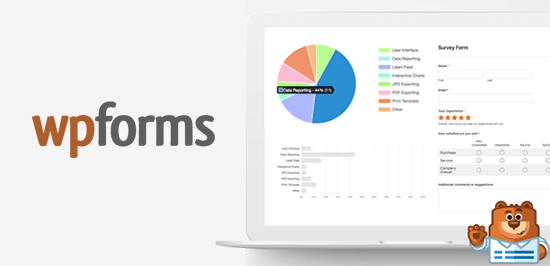
WPForms is the best WordPress contact form plugin on the market. It comes with a powerful surveys and polls addon which allows you to quickly create highly engaging survey forms.
You can combine the surveys and polls addon with other powerful WPForms features like conditional logic, multi-page forms, custom notifications, email integration, and more.
You can convert any form into a survey by simply clicking a checkbox. You can add any form field to your survey with a click including text, checkboxes, radio buttons, ratings, and the Likert scale field.
The best part about WPForms surveys is the reporting section. WPForms automatically creates beautiful reports with graphs and charts based on survey responses. You can show survey results on any WordPress page with a shortcode or redirect your users to the results page after they fill the survey.
You have the ability to export beautiful survey graphs as images to share on social media or your powerpoint presentations. You can also print the reports to include in your proposals or pitches.
For detailed instructions, see our article on how to create a survey in WordPress with beautiful reports.
2. Polldaddy

Polldaddy is a famous WordPress polls and survey plugin. It is not a contact form plugin and unlike some other plugins in the list will not be suitable for purposes other than polls and surveys.
It is available as a free plugin, but you’ll need a WordPress.com account to get the API key. The free version is limited in terms of features and will also add Polldaddy logo to your survey form.
Polldaddy is easy to use with a drag and drop tool to create your survey and polls. You can change survey sharing settings, results sharing, and styling options for each survey you create. It also includes captcha to block spam and some basic IP filtering to prevent multiple responses.
3. Gravity Forms

Gravity Forms is one of the oldest WordPress form plugins which comes with many add-ons including one to create surveys. It is easy to use, and you can create any kind of form using the form builder with many common form fields including a survey field.
However, the survey results can only be viewed inside the admin area, and there are no charts / graphs. You can export survey results to a CSV file and display the results on your website using a WordPress tables plugin.
Note: You will need at least the Elite plan to access the survey addon.
4. Quiz and Survey Master
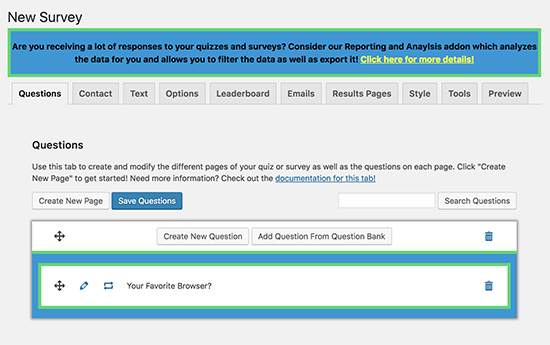
As the name suggests, Quiz and Survey Master is designed to help you add quizzes and surveys to your WordPress site. It doesn’t have the friendliest user interface, but it is well documented and comes with many useful features.
The base free plugin allows you to create surveys with all common form fields, and you can even create multi-page surveys. You can also use it to add quizzes in WordPress with interactive answers, leaderboards, and scoring.
The plugin can also send emails after completion of the survey to thank users or redirect them to any page on your WordPress website. For reporting and analysis, you will need to separately purchase a premium add-on.
5. WP-Polls
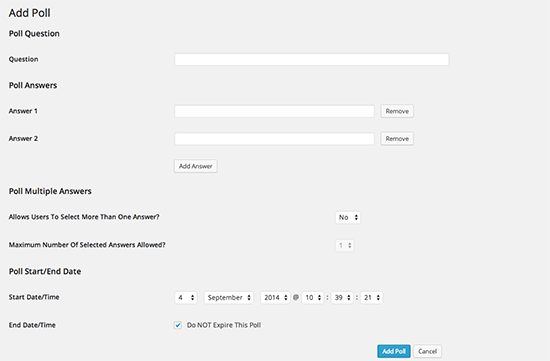
If you are looking for a simple poll solution for your users to participate, then WP-Polls is an easy free option. Unlike other plugins on this list, it doesn’t have a form builder, and you can only use radio buttons or checkboxes to collect responses which makes it quite limited.
Users are automatically shown poll results after they cast their vote. It saves user responses in the logs where you can see how registered users voted. For non-registered users, you can see IP addresses to filter out duplicate votes.
We hope this article helped you find the best WordPress survey plugin for your website. You may also want to see our guide on how to track user engagement in WordPress using Google Analytics.
If you liked this article, then please subscribe to our YouTube Channel for WordPress video tutorials. You can also find us on Twitter and Facebook.
The post 5 Best WordPress Survey Plugins (Compared) appeared first on WPBeginner.
from: WPBeginner
via Editorial Staff
Source: 5 Best WordPress Survey Plugins (Compared) Via Business Advice.
Comments
Post a Comment