 Imagine this:
Someone goes into a supermarket buy groceries. They fill their shopping cart with milk and eggs and everything they need for the week. They start heading for a checkout line, but that moment, their phone rings.
They answer the call, get distracted for a few minutes and just wander out of the store and drive away from the supermarket leaving the full cart behind.
Have you ever seen something like this?
Probably not.
But the situation with abandoned carts in online stores different. According to the Baymard Institute, carts are abandoned about 67 percent of the time, on average. This number is too serious to just ignore.
The same study also showed that when a shopper puts 10 products in their cart, they actually only purchase an average of 3.2 products. In monetary terms, online stores “lose” about 1.79 trillion dollars to abandoned carts each year.
That’s a number with 12 zeros.
So what’s going on? This problem isn’t really new, and it seems like most online store owners probably know how to properly build a sales funnel that nurtures shoppers toward a purchase. So why is the cart abandonment rate so high?
Why are users leaving carts?
You can separate shoppers that abandon their online carts into two categories:
1. They’re researchers
More than half of all shoppers; 58.6 percent are just researching. They’re in your store, just evaluating the possibility of a purchase, but they don’t intend to buy right away. Some of them may return to you when they are ready to purchase.
2. All sorts of other reasons
41.6 percent of those who start but don’t complete their order leave for one of the following reasons. They deserve your closest attention:
- 61 percent leave because extra charges (for example, delivery) turned out to be too high
- 35 percent don’t want to create an account for checkout
- 27 percent the completion of an order form and verification were too long and complicated
- 24 percent weren’t able to see or calculate the total cost of an order
- 22 percent experienced an error on the site that prevented checkout
- 18 percent didn’t want to provide their credit card info on a website
- 16 percent thought the delivery would take too long
- 10 percent weren’t satisfied with a return policy
- 8 percent wanted a payment method that wasn’t available
- 5 percent had their credit card was declined
Let them go, or try to get them back?
Alright, now we know a few reasons why online stores have such a high percentage of abandoned carts. What’s next? Should you try to coax wayward shoppers back to their cart to finish their purchase? Or maybe focus on attracting new, more confident customers?
To make the right decision, think of two metrics: retention rate and lifetime value. For an online store, it’s extremely important to do what you can to get people to finish their transactions.
So roll up your sleeves and work to correct your mistakes. And to simplify this process, here are three checklists with recommendations: technical, mandatory marketing, and additional marketing.
Master the technical side
1. Make sure your online store is fast. At every step, nothing should lag or freeze. Every second of the delay during the loading of a page increases the probability of purchase abandonment by 7 percent.
2. Make sure your website has a convenient, mobile responsive design. Think about customers that will visit your site on smartphones. Perhaps, it will look like this:
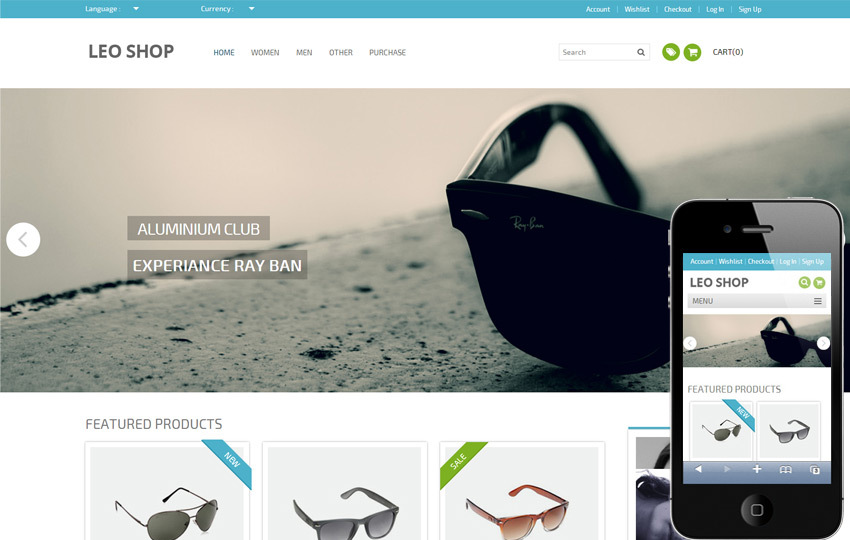
It is unlikely that any mobile user will stay on such website for a long time.
3. Ensure the safety of a purchase. By safety, I mean not only an SSL certificate but also the protection of a site by a reliable antivirus. A customer should be sure that a purchase won’t lead to any issues.
4. Make your cart easily editable. What if a customer suddenly decides to buy several units of a product? Or add another item? You mustn’t refuse them in such cases. Editing a cart should be as easy as adding goods to it.
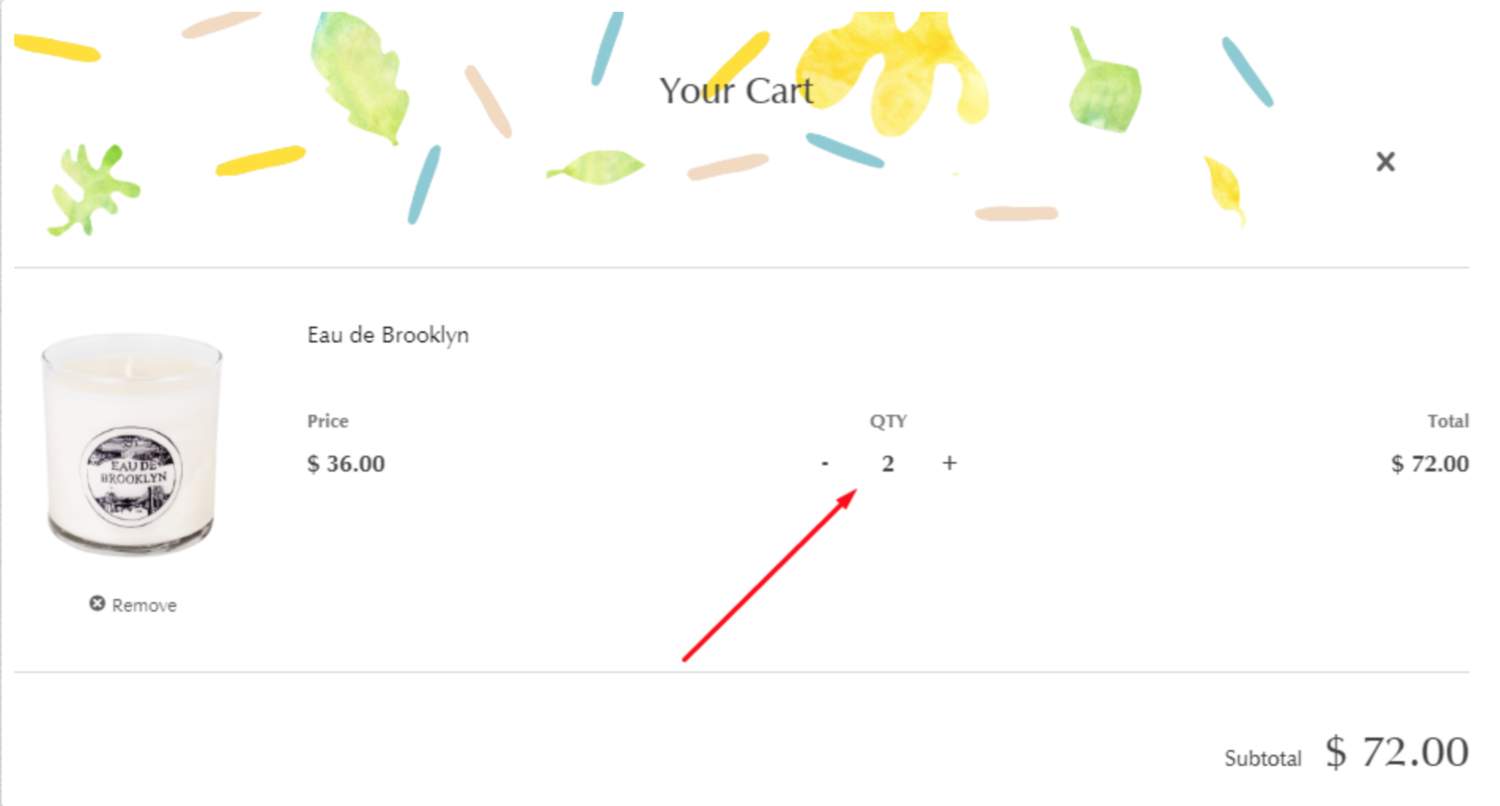
5. Use a cart that will remember its content. If your customer has put products into the cart, and then switched to another website, their order should remain active. It well may be that in a few minutes the customer will return and complete the purchase.

6. Eliminate hyperlinks in a cart. Nothing should distract your customer from making a purchase. Hyperlinks may improve interlinking on your website, but they will definitely have an adverse effect on sales. You don’t want that, do you?
7. Get rid of pop-ups in an order placement mode. Remember that any distractions can be harmful. If a visitor is already ready to buy and has opened a cart, is it worth offering them another product? There is no guarantee that he or she won’t start doubting and go to seek the advice of their other half (and then a phone will ring, and so on). Generally, cross-marketing can be useful, but everything should be used in moderation.
8. Simplify the process. The fewer steps, the more chances to achieve the goal. Keep in mind 27 percent of buyers that refuse from a purchase because of a too complex ordering process.
Optimize your website to gain trust
1. Make it easy to find your contact information. Making your company hard to access won’t foster trust among your customers. Provide a phone number, address, and a way to contact you using email or chat. Being willing to communicate directly with customers increases your sales potential.
2. Use trust signals. First of all, use reviews of satisfied customers. According to the statistics, 63 percent of users use reviews to help guide their purchase decisions. Ask your customers to review your product or service, then publish those reviews on your site. People are also influenced by tags that indicate that certain products are most popular or best reviewed.
3. Be transparent about your shipping process. You can even present it in pictures. The most important thing is to show how your delivery works, and expected delivery timeframes.
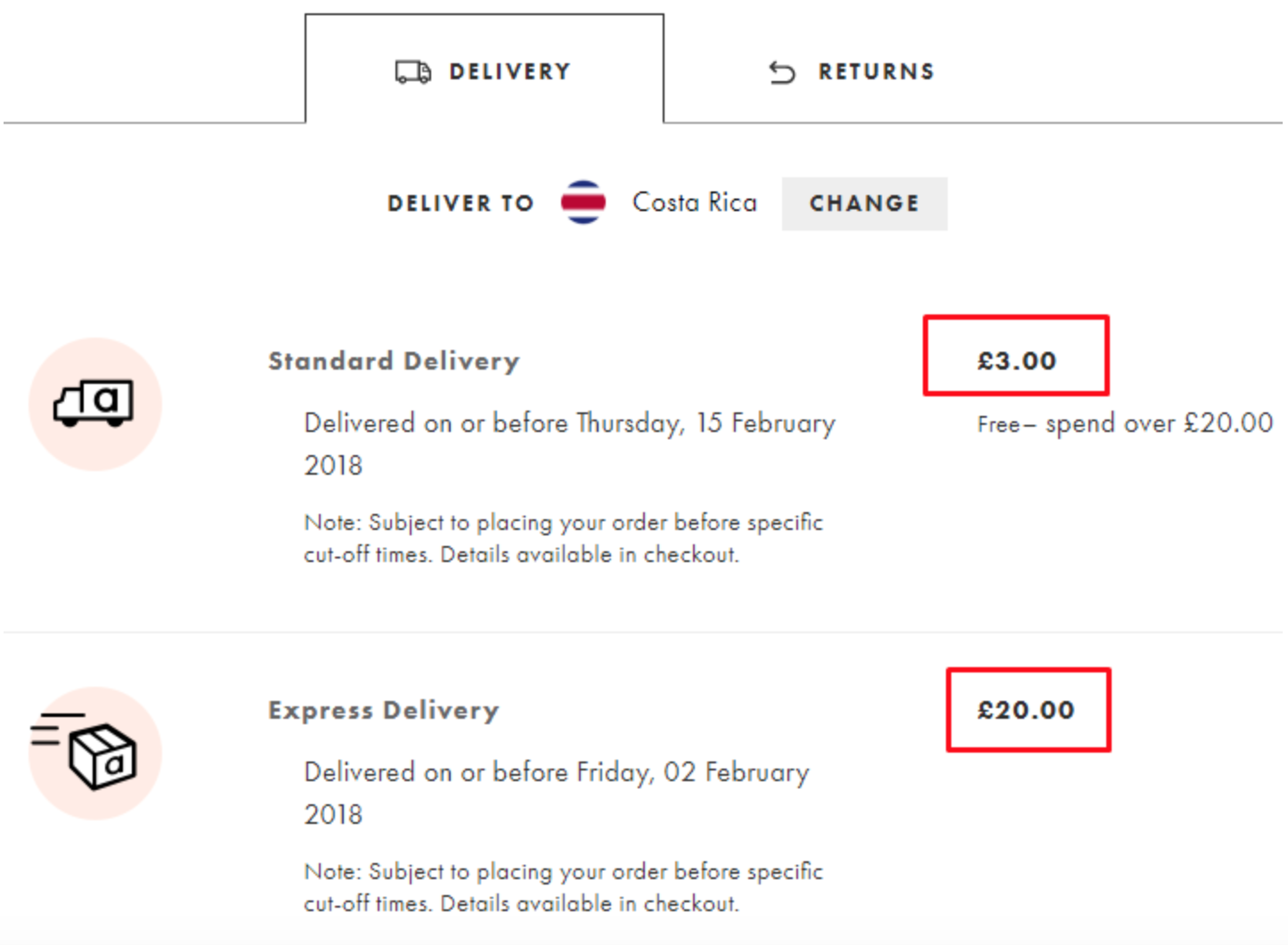
4. Show delivery costs in your shopping cart. It’s extremely unpleasant to learn that you have to pay “a little bit more” when you’re basically at the end of the purchase process.
Here is an example of how to tell about the cost of delivery:
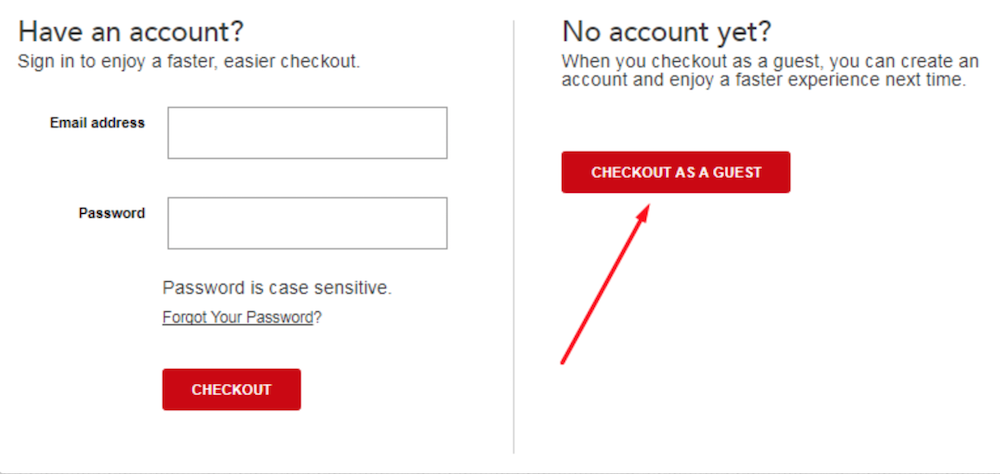
5. Don’t make buyers register. No matter how much we want to get client data, first of all, it’s necessary to ensure that shopping in your online store is comfortable. Lots of sales are lost because people don’t want to create an account. Give customers the right to decide whether they want to provide their data.
Here is a good example:
6. Provide different payment options. Your customers may be ready to pay by VISA or Mastercard. Or maybe they prefer PayPal, or Venmo, or even bitcoins? Offer your buyers a choice.

8. Set up remarketing. If a buyer does abandon your cart and they have already set up an account (so you have their email address), you can try to catch them with a reminder about a “sad” abandoned cart.
But know where to stop: The first email should be sent two to three hours after a visitor leaves a cart; the next one in 24 hours. The last reminder should be sent in in four to seven days. It’s the optimum amount of emails and the optimum timing. Remember that emails sent within three hours of adding something to a cart claim 40 percent of your total open rate.
9. Install a click map.You should know what, when, and how many times your visitors have clicked on your website. Understanding what’s working on your website can impact your conversion. https://prnt.sc/i5xhjj
Other best practices for online sales
1. Offer a money back guarantee. Anything can happen. Your readiness to “forgive and forget” will be highly appreciated by a buyer. But before you promise a refund, think it through and make sure the specifics are easy to find on your website. Customers are more likely to complete a purchase when they know your return policy.
Here’s an example:

2. Use visuals in your shopping cart. Instead of just showing a product listing, include an image of the item as well.
3. Add the most recent review of a chosen product to an order placement page. Even if a customer is already ready to buy a product, they will be pleased to know that someone else is left satisfied with the same purchase.
4. Integrate a purchase progress indicator. This is rather an optional, perfectionist-oriented feature. Similar to a progress bar when you’re filling out a survey—it might compel people who really don’t like to leave things undone. An incomplete purchase? Only in a nightmare!
5. Offer a discount to customers that have left a cart. Send an offer with a discount or a free shipment option to their email. Such a gift can convince a buyer that doubts. 54 percent of buyers will finish a purchase if they are offered a discount while placing an order! Remember to specify how long the discount will be valid.
Try to evaluate your online store as if you were a buyer. When in doubt, ask for help from a professional digital marketer with experience helping people optimize their websites for sales.
Remember that no matter how good the products or services in your online store, you also need to provide a good customer experience.
from: Bplans BlogBplans Blog
via Dmytro Tkach
Source: Why Do Shoppers Abandon Their Carts—and What Can You Do About It? Via Business Advice.
Comments
Post a Comment