Do you want to trademark and copyright your blog’s name and logo? Trademark and copyright protects your brand and business against many legal challenges. This includes illegal use of your copyrighted material or your brand’s name and logo. In this article, we will show you how to trademark and copyright your blog’s name and logo to protect your business.
Why You Should Trademark and Copyright Your Blog Name and Logo?
Registering a trademark is not mandatory to make a business website in the United States. If you run a small personal blog or business website and do not have plans to grow it further, then your creative works are already protected by the copyright.
On the other hand, if you are doing business across states and plan to grow further, then it becomes really important to register your trademark and copyright.
Registering your trademark and copyright allows you to stop others from using the same or similar business name. You can get exclusive right to use your trademark for business.
It also makes you responsible for enforcing the trademark. This means that if you find someone infringing your rights, then you need to send them a cease or desist letter and take further legal action if necessary.
What is the Difference Between Trademark and Copyright?
Copyright and trademark both protect your intellectual property rights, which is why people often confuse the two terms.
What is a Copyright?
Copyright applies to creative works including written word, text, images, illustration, artwork, and more. As soon as a work is put in a tangible form, it is protected by the copyright laws.
In easier terms, all original content of your website is protected by the copyright laws without you doing anything extra.
What is a trademark?
Trademarks on the other hand are word marks, business names, symbols, sounds, or colors that distinguish goods and services from those manufactured or sold by others and to indicate the source of the goods.
In plain words, this can be your business name, logo, brand mascot, or product name. However, you cannot register your own name as a personal brand unless it is truly unique and widely recognized such as Marks & Spencer, Johnsons & Johnsons, Calvin Klein etc.
It is important to remember that copyright doesn’t give your business or logo the same protections offered by registered trademark. For example, some part or the entirety of your copyrighted work can be used under the ‘Fair Use’ principle.
Registered Trademarks cannot be used, and it allows you to protect your brand against impostors using similar names to mislead your potential customers.
If you have already registered as a business in your state, then this doesn’t automatically protect your business name as a trademark. In fact, someone can register the same or similar name as trademark and potentially stop you from using it.
How to Apply for a Trademark
First, you need to understand what you can submit as a trademark in your application.
- You cannot submit a name that someone else is already using as their trademark.
- Your name cannot be too similar to an existing trademark
- It needs to be unique and not too generic
Next, you need to run a thorough search of the existing trademarks using the Trademark Electronic Search System or TESS on United States Patent and Trademark Office website.
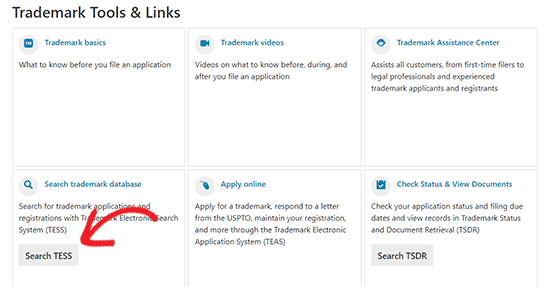
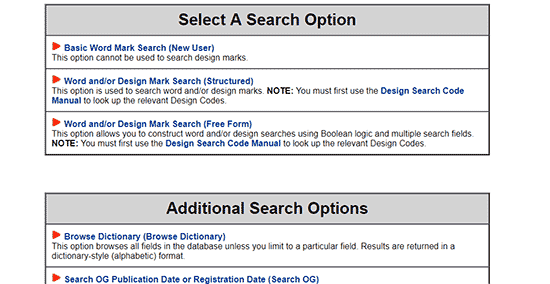
This step is really important as it can save you money in case someone else has already registered or applied for the same trademark. You can search for word mark, word or design mark, or use advanced search for free form combinations.
If the trademark is not registered, then you can go ahead and apply for the trademark by visiting Trademark Electronic Application System or TEAS available on USPTO website.
There are three different application forms available with different fees. You will also find the information on which form to choose for your application on the page.
The application forms are quite detailed, and you need to fill all the required fields.
Once you submit the application form, you will receive an email confirmation. After that, you need to wait for approval.
Filing a trademark application is a legal process that needs to be handle carefully. We recommend hiring a lawyer to help you apply for the trademark. You can also use online legal service providers like CorpNet or LegalZoom, which provide legal services to small businesses and individuals at a low cost.
How to Copyright Your Blog’s Logo?
As we mentioned earlier, all creative works are automatically protected by the copyright laws. However, registering your copyright will help you add an extra layer of protection over your copyright.
Depending on where you are located, you can usually find where and how to apply for copyright in your region online. The process would differ depending on your country’s laws and procedures.
If you are located in the United States, then you can apply for copyright by visiting the United States Copyright Office website.
You will first need to find the appropriate category for your creative work. For example, if you are applying to copyright your logo, then you will click on the visual arts section. For blog content you will need to visit the ‘Other digital content’ category.

On the next page, you will be able to download the application form with instructions available in different formats.
You can also apply for copyright registration online. You will have to provide the copies of the work you are trying to protect. For example, in case of a logo you can provide hi-res images.
Once you have applied for the copyright, it can take a long time before you hear back from the copyright office depending on the number of applications they have.
If you find the process complicated, then you can use services like CorpNet or LegalZoom, which offer low cost legal services for small businesses and individuals.
Enforcing Your Trademark and Copyright
Once you have registered your trademark or copyright, you are responsible for protecting it against infringement. Even though USPTO office will not allow anyone to register the same or similar trademark, people can still use it without registering.
First step in protecting your trademarks and copyright is to clearly indicate your registered trademarks and copyright protection on your website.
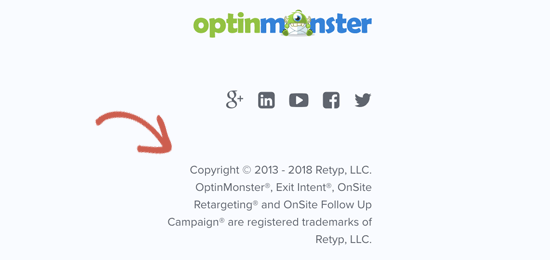
The Trademark and Copyright symbols let others know that they cannot use your protected properties for business.
If someone has stolen your blog content or logo, then you can send them a cease and desist letter asking them to remove the content. You can also file a DMCA (Digital Millennium Copyright Act) complaint with their hosting provider and search engines like Google to take down the stolen content.
We have also created a complete guide on preventing blog content scraping in WordPress.
In case a business or blog start using your registered or pending registration trademark, then you can send them a cease and desist notice too. You can also initiate legal proceedings to take further action if necessary.
Note: Nothing in this article should be construed as legal advice. For any matter of clarification, please consult an attorney.
We hope this article helped you learn how to trademark and copyright your blog’s name and logo. You may also want to see our guide on making money online to start generating more revenue from your blog.
If you liked this article, then please subscribe to our YouTube Channel for WordPress video tutorials. You can also find us on Twitter and Facebook.
The post How to Trademark and Copyright Your Blog’s Name & Logo appeared first on WPBeginner.
from: WPBeginner
via Editorial Staff
Source: How to Trademark and Copyright Your Blog’s Name & Logo Via Business Advice.
Comments
Post a Comment