Do you want to add a smooth background color change effect on your WordPress site? You may have seen on some popular websites where the background color of a specific area or the whole web page automatically transitions from one color to another. This beautiful effect can help you get users attention and improve engagement on your website. In this article, we will show you how to easily add a smooth background color change effect in WordPress.
What is Smooth Background Color Change Effect?
Smooth background color change effect allows you to automatically transition between different background colors. The change happens slowly going through different colors until it reaches the final color. It looks like this:

This technique is used to capture user attention with gentle effects that are pleasing to the eye.
That being said, let’s take a look at how to add this smooth background color change effect in any WordPress theme.
Adding Smooth Background Color Change Effect in WordPress
This tutorial requires you to add code in your WordPress files. If you haven’t done this before, then please take a look at our guide on how to copy and paste code in WordPress.
First, you need to find out the CSS class of the area that you want to change. You can do this by using the Inspect tool in your browser. Simply take your mouse to the area you want to change and right click to select the Inspect tool.
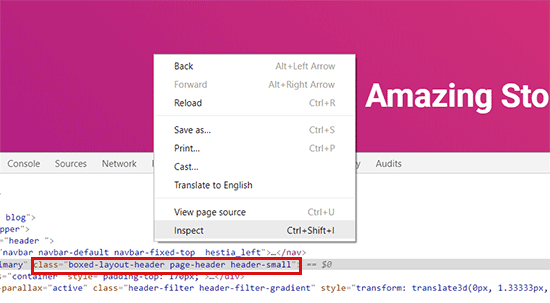
Next, you need to write down the CSS class you want to target. For example, in the screenshot above we want to target the widget area in the bottom which has the CSS class ‘page-header’.
In the next step, you need to open a plain text editor on your computer and create a new file. You need to save this file as wpb-background-tutorial.js on your desktop.
Next, you need to add the following code inside your JS file:
jQuery(function($){
        $('.page-header').each(function(){
            var $this = $(this),
                        colors = ['#ec008c', '#00bcc3', '#5fb26a', '#fc7331'];

            setInterval(function(){
                var color = colors.shift();
                colors.push(color);
                $this.animate({backgroundColor: color}, 2000);
            },4000);
        });
        });
If you study this code, then you will notice that we have used the CSS class we want to target in the code. We have also added four colors. Our smooth background effect will start from the first color, then transition to the next color, and keep cycling through these colors.
Don’t forget to save your changes to the file.
Next, you need to upload wpb-bg-tutorial.js file to your WordPress theme’s /js/ folder using FTP. If your theme doesn’t have a js folder inside it, then you need to create one.
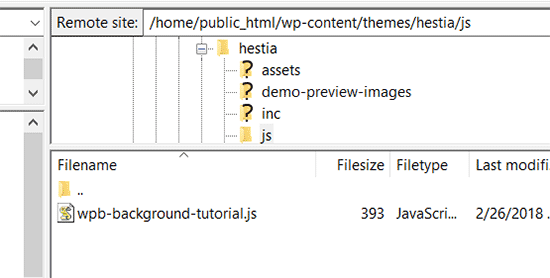
After uploading your JavaScript file, it is time to load it in WordPress.
You need to add the following code to your theme’s functions.php file.
function wpb_bg_color_scripts() {
wp_enqueue_script( 'wpb-background-tutorial',  get_stylesheet_directory_uri() . '/js/wpb-background-tutorial.js', array( 'jquery-color' ), '1.0.0', true );
 }
add_action( 'wp_enqueue_scripts', 'wpb_bg_color_scripts' );
This code properly loads the JavaScript file and the dependent jQuery script that you need for this code to work.
That’s all, you can now visit your website to see it in action. You will notice the smooth background color change effect in the area that you targeted.
There are many other ways to use background colors in WordPress to capture user attention or make your content pop-out. For example, you can try:
- Add fullscreen background images
- Add fullscreen video backgrounds
- Random background colors on each page load
- Add parallax effects to any WordPress theme
- Style individual posts with different backgrounds
We hope this article helped you learn how to easily add smooth background color change effect in WordPress. You may also want to see our list of the best WordPress page builder plugins that you can try.
If you liked this article, then please subscribe to our YouTube Channel for WordPress video tutorials. You can also find us on Twitter and Facebook.
The post How to Add Smooth Background Color Change Effect in WordPress appeared first on WPBeginner.
from: WPBeginner
via Editorial Staff
Source: How to Add Smooth Background Color Change Effect in WordPress Via Business Advice.
Comments
Post a Comment