If you recently started a blog, then you might be wondering what are the most important pages that you must have on your blog? Pages allow you to add useful information about your blog without affecting your regular blog post schedule. In this article, we will share the most important pages that every WordPress blog should have.

Why Add Pages to Your WordPress Blog
WordPress comes with two default content types called posts and pages. While posts are used to write blog articles, pages are used to create content that is not part of your regular blog post schedule.
To learn more, see our guide on the difference between posts and pages in WordPress.
Pages are normally used to add static content that is not supposed to change very often. For example, an about us page.
Keeping this content separate from your blog posts, help users easily discover it. You can also manage your pages easily, rearrange them, add them to your navigation menus, and even use page builders to create custom layouts for each page.
That being said, let’s take a look at some blog page ideas that you can use on your WordPress blog.
1. About Page
This is a must have page for almost all websites on the internet. You can name this page “About Us” or “About Me” depending on whether you have a business blog or a single-author personal blog.
You can use this page to tell users about people behind the website, its purpose, mission, values, and what users should expect to find on your blog. The about page helps build trust among your audience as they get to know the real people behind the scenes. You can also use this opportunity to showcase your most popular content.

2. Contact Page
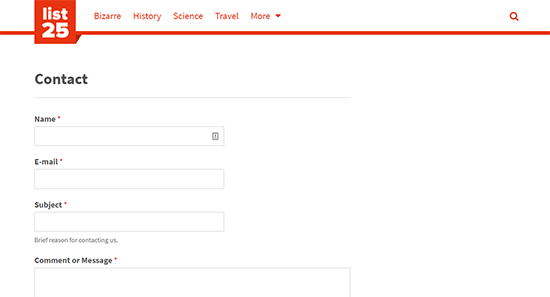
Your blog readers, advertisers, and potential business partners all need to find your contact information. A contact page allows users to quickly and easily send you a message or learn how to connect with you without leaving a public comment on your blog.
You will need to add a contact form to make it easy for users to contact you. However, you can also add your email address, location map, and social media profiles to offer more ways to connect with you.
3. Disclaimer Page
If you make money online from your WordPress blog, then you must add a disclaimer page. This is where you can let users know about how you make money from your blog. For example, if you display banner ads or promote affiliate products, then you can inform users that this is how your content is monetized.
You can take a look at WPBeginner’s Disclaimer page for inspiration.
4. Privacy Policy Page
Privacy policy page basically inform users about the data you collect on your website as well as how you and other third-parties may use this data. Even if you are not collecting any user data, third-party tools on your website like Google Analytics can still set cookies.
If you are using Google AdSense, then you are required to add a privacy policy page to your website.
You can find many privacy policy templates and generators online. Alternatively, you can also take a look at our privacy policy page and use it to create your own.
5. Terms of Service Page
If you run an online store or offer services on your blog, then you need a terms of service page. It is a legal document so getting professional legal help is highly recommended. There are also online templates that you can use, but do so at your own risk.
It allows you to limit your liability in case of misuse of information and services provided on your website. It can also be used to inform users about their responsibilities regarding the copyright and trademark, and how they can use your website, product, or services.
6. Start Here Page

As your blog gets older, you will have a lot more content to showcase on your front-page. This may leave new users a bit confused about how they can make the most out of your blog. This is where a Start Here page comes in handy.
The purpose of this page is to introduce new users to your most useful content. This give users a clear idea about how they can benefit from your content, and what are the resources that they should check out first.
Take a look at WPBeginner’s Start Here page to see how we use it to engage with new users.
7. Products / Services Page
If you are using an ecommerce platform like WooCommerce to sell products, then it will automatically create a shop page that you can just add to your navigation menus.
On the other hand, if you are selling products or offering services without using an eCommerce plugin, then you will need a product or services page for them. You can also create a parent page to list all your products and child pages for individual products with more details.
Check out WPBeginner’s WordPress plugins page as an example of a typical products page.
8. Custom 404 Page
WordPress automatically displays a 404 error page when it cannot find a specific piece of content. Normally, the 404 page is very plain and is not very useful.

You can replace that plain page with a custom 404 error page and give your users more opportunities to discover content and continue browsing. For detailed instructions, see our article on how to improve 404 page template in WordPress.
9. Archives Page
WordPress automatically create a date, category, and tag based archives. However, the information is still scattered across different pages and may not allow your users to get a bird’s eye view of your most valuable content.
This is where a custom archives page comes in. It is a simple page that you can use to display your popular posts, compact archives, top categories, tags, and more.
For detailed instructions, follow our guide on how to create a custom archives page in WordPress.
10. Advertise Page
Many blogs rely solely on ads to monetize their content. The easiest way to do this is by signing up for Google AdSense. However, you can also sell ad spots directly to the advertisers.
To do this, you will need to create an ‘Advertise’ page with information about available ad spots, your average monthly page views, and your audience demographics. Don’t forget to add a contact form at the end so that advertisers can quickly contact you.
You will need a WordPress ad management plugin to display and manage ads on your website. We recommend using AdSanity because it allows you to easily manage ads whether they are self-hosted or third-party ads like Google AdSense.
11. Write for Us Page
If you run a multi-author WordPress blog and are looking for more writers, then you need a write for us page. This page simply allow users who are looking for blogging gigs to discover the writing opportunity on your website.
You can use this page to tell users what your blog is about and what kind of content you are looking for. Most importantly, let them know how they will benefit from writing on your blog. Don’t forget to add a contact form for users to quickly send you a message.
We hope this article helped you learn about important pages that you should have on your WordPress blog. You may also want to see our ultimate WordPress SEO guide for beginners to bring more visitors to your website.
If you liked this article, then please subscribe to our YouTube Channel for WordPress video tutorials. You can also find us on Twitter and Facebook.
The post 11 Important Pages that Every WordPress Blog Should Have (2018) appeared first on WPBeginner.
from: WPBeginner
via Editorial Staff
Source: 11 Important Pages that Every WordPress Blog Should Have (2018) Via Business Advice.
Comments
Post a Comment