Are you seeing the 429 too many requests error on your WordPress site? This error can be extremely frustrating because it is hard to figure out what’s causing it. In this article, we will show you how to easily fix the WordPress 429 too many requests error.
What Causes WordPress 429 Too Many Requests Error?
The most common reason for the 429 too many requests error is when a user, bot, or a script tries to make too many requests to the servers. It is a measure to prevent DDOS attacks on websites.
However if it is not properly configured, then it may end up preventing search engines or other APIs to run properly. This would cause unexpected behavior on your website.
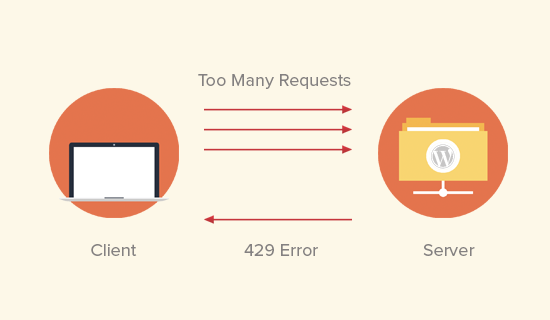
Sometimes the error is caused when a script on your website is making too many requests to another website or service using an API. In that case, the API would respond back with a 429 error code.
That being said, let’s take a look at how to easily troubleshoot and fix 429 too many requests error in WordPress.
Fixing 429 Too Many Requests Error in WordPress
This error can be caused by a number of factors. We will show you multiple ways to troubleshoot and fix the 429 too many request error.
Find and Deactivate Misbehaving Plugin
The most common culprit of 429 error is usually a bad plugin on your website. Plugins can sometimes make subsequent requests to your website which may be rejected by the server with a 429 error code.
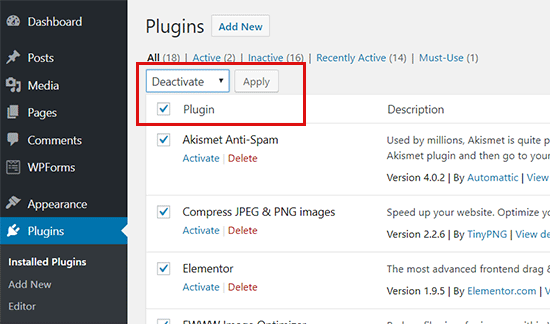
First thing you need to do is deactivate all WordPress plugins on your website. You can do this by visiting the plugins page in your WordPress admin area and selecting all plugins. After that, select ‘Deactivate’ under the bulk actions drop box and click apply.
If you are unable to access the WordPress admin area, then see our guide on how to deactivate all WordPress plugins via FTP.
Now check your website again to see if you can reproduce the 429 too many requests error again. If you can’t, then this means a plugin was causing this issue.
You can now turn on your plugins one by one and check your website after activating each plugin. This way you will be able to find the plugin causing the error.
Once you find the plugin causing the error, you can replace it with an alternative plugin or try reaching out to the plugin author to let them know about the error.
Switch to a Default WordPress Theme
More and more WordPress themes include functionality that normally comes with plugins. Such themes may also cause 429 error too many requests on your website.
The easiest way to find out is by switching to a default WordPress theme like Twenty Seventeen. If this resolves the 429 error issue, then you can find another WordPress theme or report the problem to the theme developer and they may be able to fix it.
Ask Your Hosting Provider
A lot of times, you will see a 429 too many requests error in third-party services that need access to your website. This could be search engines, crawlers, and other web apps.
If you are seeing the error in Google Search console or any third-party service, then most likely they are sending too many requests to your website. In that case, you need to ask your WordPress hosting provider to not block those requests.
We hope this article helped you fix the WordPress 429 error too many requests on your website. You may also want to see our list of most common WordPress errors and how to fix them.
If you liked this article, then please subscribe to our YouTube Channel for WordPress video tutorials. You can also find us on Twitter and Facebook.
The post How to Fix the WordPress 429 Too Many Requests Error appeared first on WPBeginner.
from: WPBeginner
via Editorial Staff
Source: How to Fix the WordPress 429 Too Many Requests Error Via Business Advice.
Comments
Post a Comment