As a blogger, you have likely come across an orange icon labeled RSS feed. If you have ever wondered what is RSS and how you can use RSS to grow your WordPress site, then you’re in the right place. In this article, we will explain what is RSS, what are the benefits of RSS, and how to use it to grow your WordPress blog.
What is RSS?
RSS is a type of web feed that allows users and applications to receive regular updates from a website or blog of their choice. The acronym RSS stands for Really Simple Syndication or Rich Site Summary. It is sometimes referred to as the feed or RSS feed.
In the early days of internet, if you wanted to keep track of updates on your favorite website, then you had to bookmark it and then manually visit to see if there were any updates.
RSS feed solved that problem by allowing users to keep track of their favorite websites without having to manually visit the website each time.
RSS allows bloggers and publishers to automatically syndicate their content, so that people can read it in their email, feed reader and other devices.
How Does RSS Feed Work?
RSS feeds work by publishing your latest content in a structured XML document. This feed contains your full articles or the summary, and metadata for each item like date, author, category, etc.
This XML document can then be fetched and read with a RSS feed reader. There are many RSS feed reader software available for all operating systems, desktops, and mobile devices.
Here is what an example RSS feed looks like:
<?xml version="1.0" encoding="UTF-8"?>

<channel>
<title>WPBeginner</title>
<link>https://www.wpbeginner.com</link>
<description>Beginner's Guide for WordPress</description>
<lastBuildDate>Tue, 02 Dec 2018 14:13:37 +0000</lastBuildDate>
<language>en-US</language>

    <item>
        <title>How to Fix WordPress Posts Returning 404 Error</title>
        <link>http://feeds.wpbeginner.com/wpbeginner/</link>
        <pubDate>Tue, 02 Dec 2018 11:58:18 +0000</pubDate>
        <dc:creator>Editorial Staff</dc:creator>
        <category><![CDATA[Tutorials]]></category>
        <guid isPermaLink="false">https://www.wpbeginner.com/?p=10968</guid>

        <description><![CDATA[<p>Description of post goes here...]]></description>
        <content:encoded><![CDATA[<p>Post goes here....]]></content:encoded>
        </item>
All WordPress blogs come with built-in support for RSS feeds. By default, each page of your WordPress site contains a meta tag that points to your website’s RSS feed location.
You can disable RSS feeds in WordPress, but continue reading and you might change your mind about disabling them.
What are The Benefits of RSS?
RSS makes it easy for users to subscribe to your content. Using an RSS feed, they can receive updates from your blog or website directly in their feed readers, desktop applications, and many other devices.
Subscribers don’t have to remember your website URL because they can bring the content into a central location where they like to read all of their favorite websites at once.
Your content also becomes portable, and your subscribers can even take it with them for offline reading.
RSS feeds help you build and nurture a loyal following around your blog. RSS subscribers are more likely to share your content on social media. Many of our readers automatically tweet every new WPBeginner article using RSS feed and IFTTT.
As a user, you can subscribe to your favorite websites and read them all at one place. This allows you to quickly scan through your favorite news and blog sites. If you want to leave a blog comment, then you can easily visit the individual article and leave your comment.
Most modern feed readers allow you to sort your reading lists into categories and groups. By using RSS efficiently, you can really maximize your reading time.
How to Use RSS Feeds to Read Your Favorite Websites?
You can subscribe to RSS feeds by using apps called feed readers. There are many free feed readers available on the market for all popular operating systems and devices.
Following are just a few of the top RSS feed reader apps that you can use.
- Feedly – (Web, Browser Add-ons, iOS, Android, Kindle)
- Innoreader – (Web, Android, iOS)
- The Old Reader (Web, Mac, Windows, Android, iOS, and more)
- Bloglovin’ (Web, Android, iOS)
We recommend using Feedly. It is available as a browser add-on as well as a mobile app for iOS, Android, and Kindle devices.
By using Feedly, you can sync your RSS subscriptions across your devices and resume reading wherever you left it. Adding your favorite websites to Feedly is really simple, just enter the URL of the website and click the Follow button to subscribe.
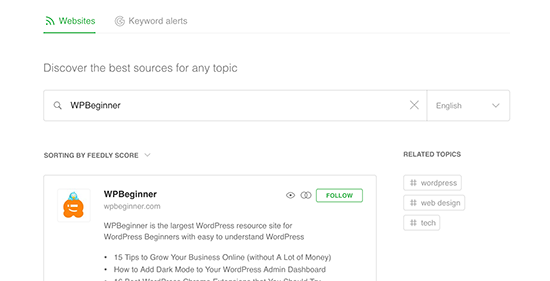
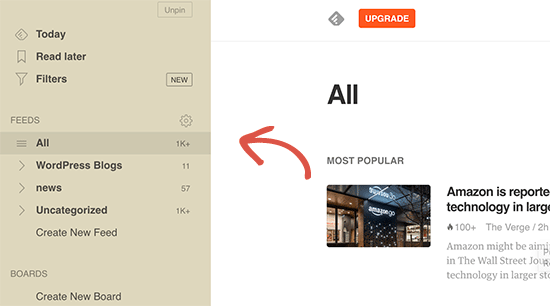
In most feed readers, you can search for topics that interest you and subscribe to popular sources on those topics. You can also categorize your favorite sites into topics. Feed readers such as Feedly come with features to print, share, and email articles that you find interesting.
How to Promote Your WordPress RSS Feed
As a WordPress user, your website already publishes an RSS feed. You can find your RSS feed by simply adding /feed/ at the end of your website’s address. For example:
https://www.wpbeginner.com/feed/
Don’t forget to replace wpbeginner.com with your own domain name.
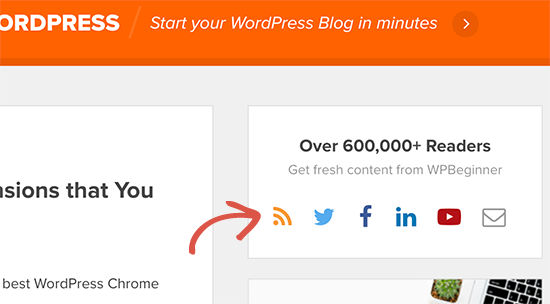
You can encourage visitors to subscribe to your RSS feed by adding an RSS icon to your sidebar or another prominent location. Here is how we do it on WPBeginner:
You can also connect your RSS feed to an email marketing service and allow your users to receive your blog posts directly in their inbox. For instructions, see our guide on how to add email subscriptions to your WordPress blog.
Take Your WordPress RSS Feed to The Next Level
RSS feeds are extremely powerful, and with little effort you can use them to build a loyal following.
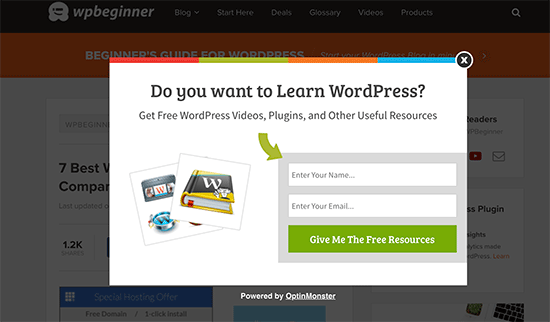
1. Use RSS Feed to build an email list
If you are not already building an email list, then you need to start immediately. See our guide on why you should start building your email list right away.
This is where you’ll need OptinMonster. It is the best lead generation software on the market and allows you to convert website visitors into subscribers.
2. Use RSS Feed to grow social media following

Social media websites like Facebook and Twitter can help you grow your website traffic. However, to keep your social media profiles active you need to regularly post content.
Using RSS feeds with IFTTT, you can automatically share your new blog posts to all your social media profiles.
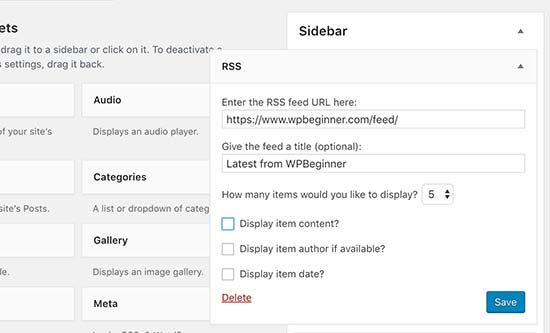
3. Cross Promote Your Blog Using RSS Widget
WordPress comes with a default RSS widget that you can add to your sidebar and display latest posts from any other blog. You can use this widget to cross-promote your own blogs.
4. Customize your RSS feed
There are some advanced hacks and tricks that you can use to customize your WordPress RSS feeds.
- Add content to manipulate your RSS Feed
- Add featured images to your RSS feed
- Use RSS feeds for categories
- Use RSS feeds for custom post types
Need even more tips? See our list of the best tips to optimize your WordPress RSS feed.
We hope this article explained what is RSS and how you can use RSS in WordPress to grow your website. You may also want to see our guide on how to get more visitors to your WordPress site.
If you liked this article, then please subscribe to our YouTube Channel for WordPress video tutorials. You can also find us on Twitter and Facebook.
The post What is RSS? How to use RSS in WordPress? appeared first on WPBeginner.
from: WPBeginner
via Editorial Staff
Source: What is RSS? How to use RSS in WordPress? Via Business Advice.
Comments
Post a Comment