Recently, one of our readers asked: what is rel=”noopener” in WordPress? If you select to open a link in a new window, then WordPress adds this attribute to your link. In this article, we will explain what is rel=”noopener” in WordPress and how it affects your website.
What is rel=”noopener” in WordPress?
rel=”noopener” is an HTML attribute that’s added to all WordPress links that are selected to open in a new browser tab. It is also accompanied by a rel=”noreferrer” attribute. This feature was introduced in WordPress to address a security vulnerability which can be exploited by malicious websites.
There are some JavaScript features that allow a new tab to get control of its referring window. If you link to an external website affected by the malicious code, then that website can use window.opener JavaScript property to change the original page (your website) to steal information and spread malicious code.
Adding rel=”noopener” prevents new tab from taking advantage of this JavaScript feature. Similarly, the rel=”noreferrer” attribute prevents passing on the referrer information to the new tab.
WordPress always stays ahead of the curve to help with website security. When you add a link and select ‘Open in New Tab’, then WordPress will add the rel=”noopener” and rel=”noreferrer” to the link code.
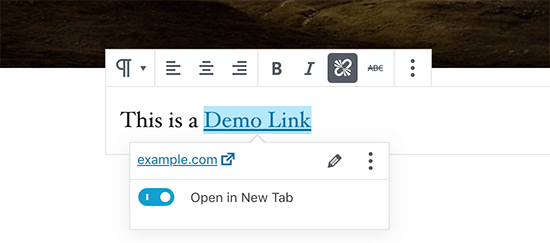
The HTML code generated by WordPress looks like this:
<a href="https://example.com" target="_blank" rel="noreferrer noopener" aria-label="This is an external link (opens in a new tab)">demo link</a>
How rel=”noopener” Affects your WordPress SEO?
Even though the rel=”noopener” attribute improves WordPress security, several users want to avoid using it because they think it will impact their WordPress SEO.
That’s just a myth.
It has no impact on your WordPress site’s SEO rankings or the overall WordPress performance.
What’s the Difference Between noopener vs nofollow?
It’s easy to mix rel=”noopener” with rel=”nofollow”. They are completely separate.
The noopener attribute prevents your website from cross-site hacking and improves WordPress security.
On the other hand, nofollow attribute prevents your website from passing on SEO link juice to the linked website.
Search engines look for and consider nofollow attribute when following a link on your website. However, they do not give consideration to the noopener tag.
By default, WordPress does not allow you to add nofollow to your external links. If you want to add nofollow in WordPress, then you will need to use a plugin. For details, see our article on how to add title and nofollow to links in WordPress.
Does rel=”noreferrer” Affect Affiliate Links in WordPress?
The rel=”noreferrer” does not affect affiliate links in WordPress. Some users believe that it does because rel=”noreferrer” prevent passing the referrer information to the new tab.
However, most affiliate programs provide you with a unique URL that has your affiliate ID. This means your affiliate ID is passed along as a URL parameter for the other website to track.
Secondly, most affiliate marketers use a link cloaking plugin for their affiliate links.
With link cloaking, the affiliate link that your users click on is actually your website’s own URL which then redirects users to the destination URL.
How to Disable rel=”noopener” in WordPress?
There is no need to remove rel=”noopener” from links on your website. It is good for your website’s security and has no performance or SEO impact on your website.
However, if you must remove it, then you will have to disable Gutenberg block editor in WordPress and use the old classic editor. After that, you will need to add the following code to your theme’s functions.php file or a site-specific plugin.
add_filter('tiny_mce_before_init','wpb_disable_noopener');
function wpb_disable_noopener( $mceInit ) {
    $mceInit['allow_unsafe_link_target']=true;
    return $mceInit;
}
Note: We do not recommend removing rel=”noopener”. There is no good reason to do so.
We hope this article helped you learn about rel=”noopener” in WordPress. You may also want to see our guide on how to track outbound links in WordPress.
If you liked this article, then please subscribe to our YouTube Channel for WordPress video tutorials. You can also find us on Twitter and Facebook.
The post What is rel=”noopener” in WordPress? (Explained) appeared first on WPBeginner.
from: WPBeginner
via Editorial Staff
Source: What is rel=”noopener” in WordPress? (Explained) Via Business Advice.
Comments
Post a Comment