Do you want to exclude a specific category from your website’s homepage? By default, WordPress displays posts from all categories on your homepage. In some cases, you may not want that. In this article, we will show you how to easily exclude a category from your WordPress homepage.
Why Exclude a Category from WordPress Homepage?
WordPress allows you to sort content into categories and tags. Now sometimes you may want to use a category for posts that are not part of your normal blog entries.
By default, WordPress does not allow you to hide posts in specific categories from homepage or archives. This leaves you with unwanted posts appearing on your homepage.
That being said, let’s see how you can easily exclude a specific category from your WordPress homepage. We will show you two different methods, and you can choose the one that best fits your need.
Method 1: Exclude a Category from WordPress Using Plugin
First thing you need to do is to install and activate the Ultimate Category Excluder plugin. For more details, you should follow our guide on how to install a WordPress plugin.
Upon activation, you’ll need to go to Settings » Category Excluder page. It will display all the categories that are available on your WordPress blog.
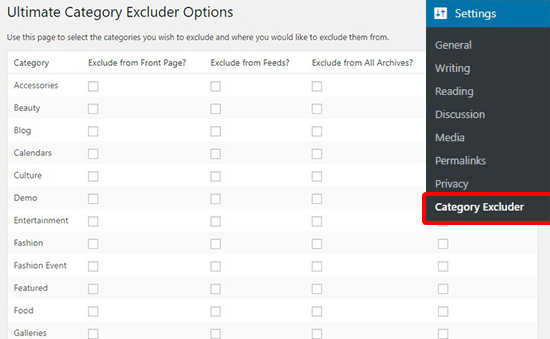
From here, you can simply check one or multiple categories under the ‘Exclude from front page’ column. If you want, then you can also exclude the category from RSS feeds, archives, or even from WordPress search.
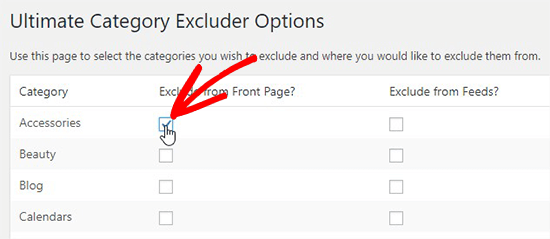
Don’t forget to click on the Update button to store these settings.
Now you can visit your website to see that the posts from the selected categories are excluded from the front page.
Method 2: Exclude a Category from WordPress Homepage Using Code
This method requires you to add code to your WordPress files. If you haven’t done this before, then see our guide on how to copy and paste code snippets in WordPress.
You will need to add following code to your theme’s functions.php file or a site-specific plugin.
function exclude_category_home( $query ) {
if ( $query->is_home ) {
$query->set( 'cat', '-5' );
}
return $query;
}

add_filter( 'pre_get_posts', 'exclude_category_home' );
Don’t forget to replace ID (-5) with your category ID. It will hide all blog posts from homepage belonging to the category that matches this ID.
Note: Make sure to add a minus (-) sign with the category ID.
Not sure how to find the category ID? See our guide on how to find category IDs in WordPress.
If you want to exclude multiple categories, then you can change the code like this:
function exclude_category_home( $query ) {
if ( $query->is_home ) {
$query->set( 'cat', '-5, -9, -23' );
}
return $query;
}

add_filter( 'pre_get_posts', 'exclude_category_home' );
Simply replace the IDs (-5, -9, -23) with your category IDs to exclude them from your WordPress homepage.
We hope this article helped you learn how to exclude a category from your WordPress homepage. You may also want to see these most wanted category hacks and plugins for WordPress that will help you use categories more efficiently.
If you liked this article, then please subscribe to our YouTube Channel for WordPress video tutorials. You can also find us on Twitter and Facebook.
The post How to Exclude a Category From Your WordPress Homepage appeared first on WPBeginner.
from: WPBeginner
via Editorial Staff
Source: How to Exclude a Category From Your WordPress Homepage Via Business Advice.
Comments
Post a Comment