
How to Redirect Users to a Random Post in WordPress

Do you want to redirect users to a random post? A random post allows users to explore older articles and read posts that are hidden in your blog archives. In this article, we will show you how to easily redirect users to a random post in WordPress.
How to redirect users to a random post in WordPress

Why You Should Redirect Users to a Random Post?

By default, WordPress posts appear in reverse chronological order (from newest to oldest), so your users will read the latest post first. If you write regularly on your blog, then your users may not be able to discover your older articles.

One way to overcome this issue is to display random posts in the sidebar of your blog. It will allow your users to discover new content while increasing your page views.

You can also redirect users to a random post from 404 error pages or add a ‘Surprise Me’ button in your blogs custom archive page which takes users to a random post.

That being said, let’s take a look on how to redirect users to a random post in WordPress.

Redirecting Users to a Random Post in WordPress

First thing you need to do is to install and activate the Redirect URL to Post plugin. For more details, see our step by step guide on how to install a WordPress plugin.

Upon activation, you’ll see the URL query parameters for redirection on the WordPress plugins page. This plugin has no other settings page.

You can use any of these query parameters in your posts and pages to redirect users to random posts, latest posts, and other older articles.
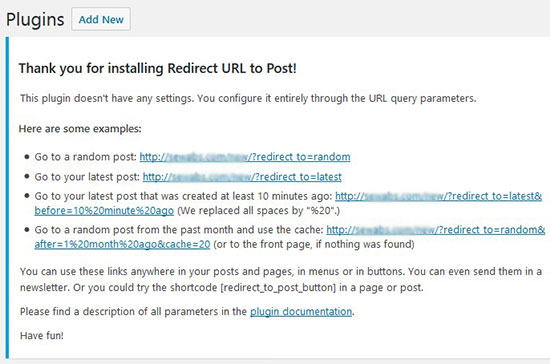
Redirect URL parameters

To redirect users to a random post, you need to copy the random post query parameter from here and add it in your error pages and other pages as a link.

Clicking on the link will redirect users to a different random post.

You can also add a button for redirection on your blog. Simply add this shortcode in your WordPress posts and pages to display the random post button.

[redirect_to_post_button]

When users click on this button, they will be redirected to a random post on your website.
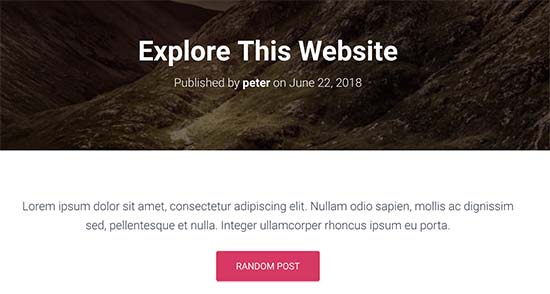
Random post button

We hope this article helped you learn how to redirect users to a random post in WordPress. You may also want to see our expert pick of the best WordPress search plugins to improve your site search.

If you liked this article, then please subscribe to our YouTube Channel for WordPress video tutorials. You can also find us on Twitter and Facebook.

The post How to Redirect Users to a Random Post in WordPress appeared first on WPBeginner.

from: WPBeginner
via Editorial Staff

Source: How to Redirect Users to a Random Post in WordPress Via Business Advice.

Comments

Popular posts from this blog

How to Add Web Push Notification to Your WordPress Site

Do you want to add push notifications to your WordPress site? Push notifications allow you to send notifications to users even when they are not visiting your website. In this article, we will show you how to easily add web push notifications to your WordPress site. We will also talk about the best WordPress push notification plugins and how to send desktop & mobile push notifications from your WordPress site. What is Push Notification? Push notifications are clickable messages displayed on top of user’s desktop or notification area on their mobile device. They can be shown even when the user’s browser is not open. Aside from desktop, web push notifications also work on mobile devices. This allows you to reach your users across devices with latest updates and offers. Web push notifications have proven to be a very effective way to convert website visitors into customers and loyal followers. Why Add Web Push Notifications to Your WordPress Site? We have already discussed tha...

5 Things You Should Know about Purchasing a Company Vehicle

  Many businesses require a vehicle to do business. It transports both goods and people from point A to point B and allows you to keep business dealings in-house. However, choosing a good company vehicle can be somewhat complex. You shouldn’t take the decision lightly. Here are a few things you should know before you buy a vehicle for your business: Accidents can happen, placing liability on you. You might think that an accident won’t happen if you hire drivers with a good track record and write a rule-book with strict policies and procedures. These are good tactics for mitigating some of the risks associated with commercial car accidents, but they won’t protect you completely. More than two million car accidents happen each year. Many of them are commercial truck accidents, costing millions in damages. Since commercial drivers are on the road more than personal drivers, they’re significantly more likely to cause an accident. Understanding the liability that’s placed on yo...

5 Essentials for Starting a Business in 2019

Is 2019 the year that you finally start your own small business or startup? There are a lot of good reasons to consider starting your company this year. You can do it. You don’t necessarily need a degree in business or finance to be successful. But keep reading—there are a few essentials for getting up and running that you won’t want to miss. 1. A great business idea If you’re kicking around a few ideas for your new company, or you think you have a concept but aren’t sure it will work, use these resources to help you think it through before you invest a ton of money and time. Validate your best ideas Our guide to coming up with a great business idea is packed with ideas for all kinds of industries. This article on generating hundreds of business ideas is a great place to start. When you’ve settled on one (or a few) favorites, download our free Business Idea Validation Checklist , which is an excellent tool for making sure your idea has legs before you invest any more time or...