 Animated explainer videos are engaging and can help you create strong connections with current and potential customers. In this article, we’ll cover what makes a great animated explainer video, and how to create one for your business.
Why animated videos?
Wait, aren’t all well-crafted explainer videos engaging? Well, yes, but with animation, you have some extra benefits that you may not have thought about:
They are great for explaining complex products
Compared with live action videos, animation can help you show your product in detail. Adding graphics to highlight important data that may help transform seemingly boring and complicated numbers into something your audience can easily digest and remember.
They are fully customizable
Thought the power of animation, you can actually create your own world. Let’s say you have a musical product and you would like your character to be dancing in a disco or a live theater—or both! That would be very expensive and time-consuming for a live action video. You might even need to hire thousands of actors to have a crowd. With animation, you can create your own scenario and your characters as you wish.
Don’t just trust what I say, trust Dropbox. The file hosting service saw a 10 percent conversion increase from their animated explainer video—meaning,10 million new users!
The most popular explainer video styles are:
- Screencast
- Cartoon style
- Whiteboard
- Motion graphics
This article will be all about cartoon-style explainer videos, because it’s a very engaging style, and budget-wise is an ideal choice for startups and entrepreneurs.
So, let’s dive in!
1. First things first: Know your audience
Before starting, it’s essential to have a clear perspective about your target market. If you still don’t, you should use some analytics tools like Google Analytics to help you understand more about your ideal customers’ demographics.
For example: Who is coming to your website? Are they male or female? How old are they?
It’s helpful to know your target audience because they should be represented by your video’s main character. Once you have gathered that data, try to picture yourself how they would look as a character. Is the person a woman? What is she wearing? What is her job? This is called a customer or buyer persona.
Our animated video production company, Yum Yum Videos, created this story in which we leveraged all that information about a client’s target audience to build the main character.
2. Write your script
Now that you have your character, you need to write a powerful but very short story in which your character will experience a problem—your audience’s pain point—and your product will help him or her to solve that problem.
This kind of animated marketing video script has three moments:
The what: You need to show your target audience what problem your product solves. This way, you will quickly grab their interest and keep their attention until the end.
The how: Now that they know what problem you solve, you will need to show how your product can help them. In general, it is at this moment when your logo will be shown.
The why: It’s time to sell! Tell your target audience why your product is the best choice in the market to solve their problem.
Keep in mind that 160 scripted words in English are equal to around one minute of video. So, for a 90-second video, you will need 240 words.
This is the video that helped Dropbox increased its conversion and make $50 million in additional revenue. You’ll see the three moments of the marketing plot crystal clear: in the first thirty seconds, they explain their audience’s pain point; after their logo, the solution is presented; then, they explain more about their product’s unique features. Check it out!
3. Let’s get artsy! Draw your storyboard and make style frames
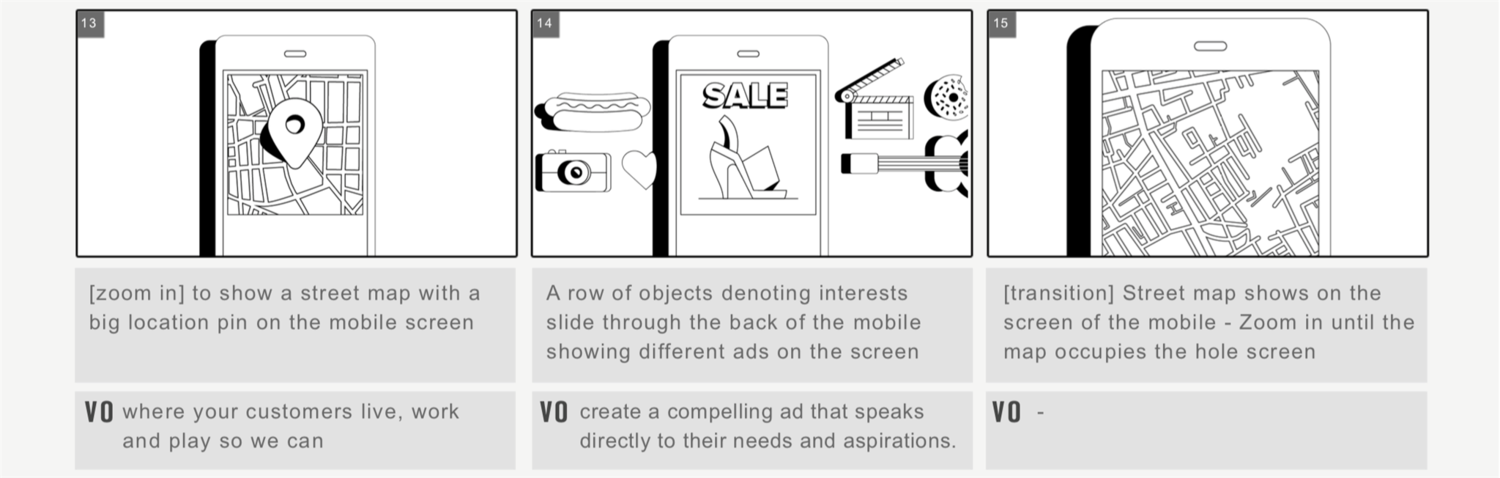
This pre-production step shows in still images what the video will be like frame by frame. Similar to a cartoon, the storyboard allows us to see what the camera will show in each shot before we get into the production of the video.
If you are making your video on your own, here’s one software platform option you have to draw a storyboard.
This is a fine storyboard sample from one of our animated videos (VO stands for voice-over):
4. Create your style frames
Once you’ve cemented your basic storyboard, if you’re working with a professional company, they’ll put together style frames.
Style frames are high-resolution frames (based on the storyboard) that represent part of the video—something like taking pictures of your finished video. These colored still images help to visualize the true quality of the final video way before it’s done.
See a clear example below:

5. Consider design options
Here is where you have two options: you can use a template-based product, or hire a professional company.
If you have some budget and time restrictions, you can try some of the several software platforms to create an animated video. You’ll see they have pre-designed characters and backgrounds that are used over and over for several companies.
If you hire an animated production company, you only need to provide them with your insight about your target audience, your product’s benefits, and your video’s main goal. They will take care of the rest of the steps to create an impactful video.
Once all of the previous stages are checked by the client, professional illustrators will digitally draw all the graphic elements that will be used in the video. These include characters, typographies, and backgrounds. Every detail will be fully customized to represent your unique brand’s personality.
For example, CrazyEgg—the service created by Hiten Shah and Neil Patel—increased conversions by 64 percent and made $21,000 of extra monthly revenue when they placed this animated marketing video on their landing page.
Pay attention to their main character: it’s an egg with a funny mustache! You can only get that level of customization with a professional company, not with a template. Simply put, without that funny character, this whole video just wouldn’t be funny at all.
6. Source your animation
Using all the graphic elements, storyboard frames, and voice-over recordings, professional animators manage to set the entire video in motion. From character’s movements in the scene to facial expressions, professional digital artists will make your video look funny when it has to be funny.
On that note, have you checked out how important are these CrazyEgg’s facial expressions and his mustache’s movements to convey this brand’s message?
7. Record your voice-over
Usually, in an animated explainer video, characters don’t speak. Instead, there’s a voice-over—like a narrator— that needs to be recorded separately.
Choosing the right voice is the key to truly representing your audience. It needs to match their profile and set your video’s tone and mood. That’s why it’s very important to consider hiring a professional voice-actor that’s also a native speaker (from the country of the target audience) in order to enhance your script.
Of course, there are some free automated voice generators available on the web, but they sound robotic and strange when you need your voice-over to be funny and witty. Believe me, making that mistake could ruin your video instead of building that priceless bond with your audience!
8. Add sound FX
Let’s assume your animated story has a skyrocket in it like in the storyboard above. Well, you’ll probably need the sound of a skyrocket taking off. All those sounds are what we call FX and you will need them to enhance your story.
Bear in mind that you’ll also need music to help set the tone of your explainer video. The rule of thumb is that music without lyrics is better to avoid the risk of overlapping the voice-over.
The music editing and sound FX mixing, along with the final audio adjustments, makes up the final stage of the video production process.
Get to it!
Remember, no matter if you are going to make your video yourself or hire a professional company, you need to know who your target audience is and what its pain points are.
Make sure you follow every step of this guide when crafting an animated video: write a script, make a storyboard, design your characters, use a professional voice-over, and add music. Don’t forget to use your brand graphics and colors to build a strong identity.
If you need more inspiration, grab some popcorn and check out our best animated explainer videos.
from: Bplans BlogBplans Blog
via Victor Blasco
Source: How to Make an Animated Explainer Video That Resonates With Your Audience Via Business Advice.
Comments
Post a Comment